
Pricing Details
Basic Plan: $6.60/month ($79.00 billed yearly) includes core features like AutoCut silences v2 and AutoCaptions. AI Plan: $14.90/month ($178.80 billed yearly) provides full access to all advanced AI features. Disclaimer: Pricing details may change. For the most current information, refer to the AutoCut website.
Product Visuals (1 images)
Strengths
- Efficiency in Editing: Saves significant time by automating routine tasks, allowing creators to focus on more creative aspects.
- Enhanced Viewer Engagement: Features like animated captions and auto zooms contribute to a more engaging and polished video.
- Ease of Use: Intuitive design makes it accessible for both novice and experienced editors.
- Continuous Innovation: Regular updates and new features ensure the tool evolves to meet the needs of modern video editors.
Limitations
- Limited Compatibility: Currently only compatible with Adobe Premiere Pro, which may limit its use for users of other editing software.
- Learning Curve: New users might need some time to become familiar with all features and optimize their use.
- Subscription-Based Pricing: Ongoing costs could be a concern for freelancers or small studios on a tight budget.
What You Get
Key Features
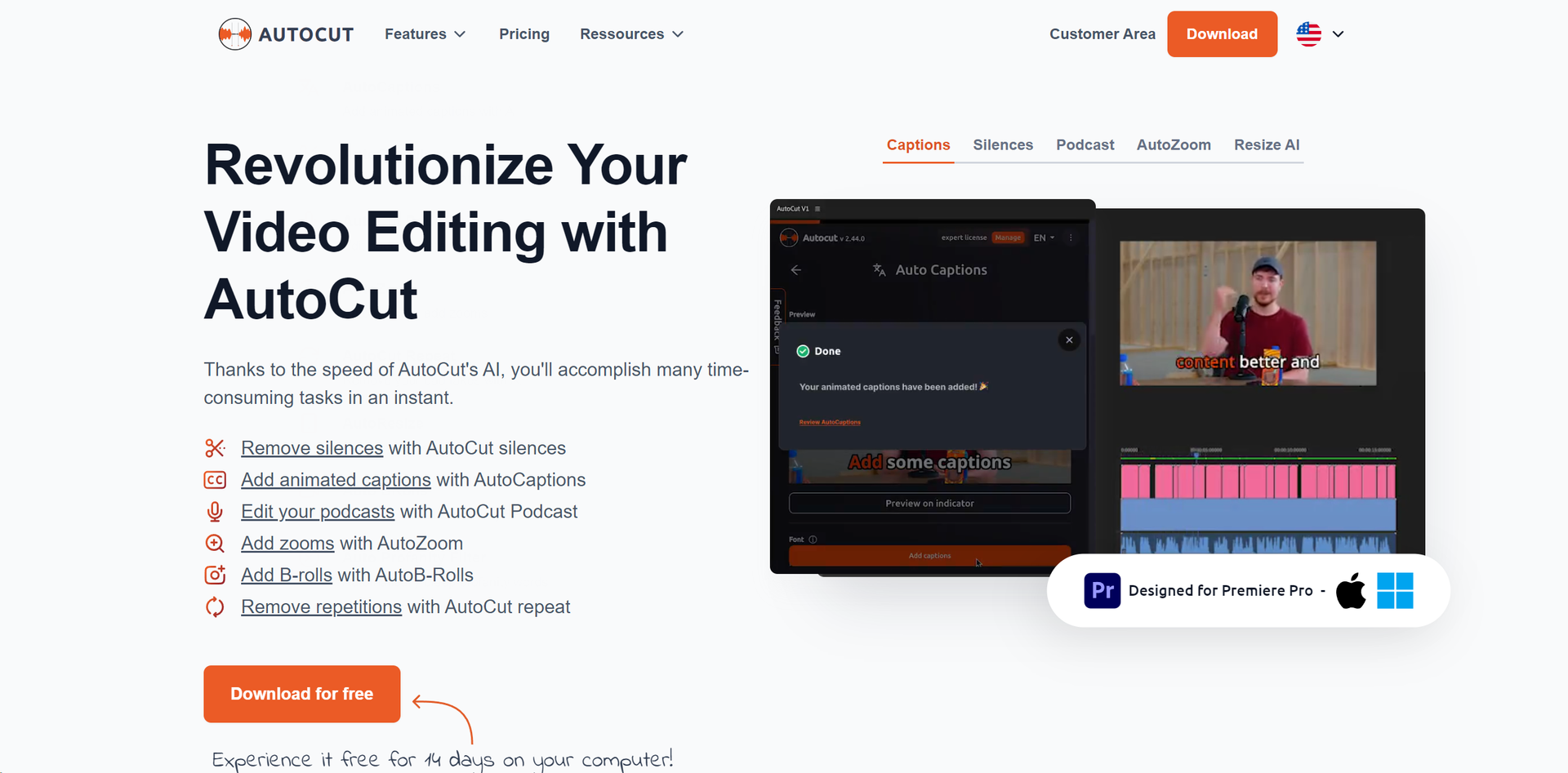
- Automatic Silence Remover: Efficiently detects and removes unwanted silences from a video, ensuring a fluid and engaging viewing experience.
- Animated Captions with One Click: The AutoCaptions feature automatically syncs animated subtitles with spoken words, ideal for enhancing viewer engagement on platforms like TikTok and YouTube.
- Instant Podcast Editing: Simplifies podcast editing by automatically detecting silences and applying dynamic jump cuts and transitions.
- Sophisticated AutoZoom: Adds professionalism to videos by automatically zooming in on subjects, maintaining viewer focus.
- Seamless Integration of B-Rolls: Integrates relevant B-Roll footage automatically, enriching video content without manual search and placement.
- ProsEfficiency in Editing: Saves significant time by automating routine tasks, allowing creators to focus on more creative aspects.Enhanced Viewer Engagement: Features like animated captions and auto zooms contribute to a more engaging and polished video.Ease of Use: Intuitive design makes it accessible for both novice and experienced editors.Continuous Innovation: Regular updates and new features ensure the tool evolves to meet the needs of modern video editors.ConsLimited Compatibility: Currently only compatible with Adobe Premiere Pro, which may limit its use for users of other editing software.Learning Curve: New users might need some time to become familiar with all features and optimize their use.Subscription-Based Pricing: Ongoing costs could be a concern for freelancers or small studios on a tight budget.
Best For
- AutoCut serves a diverse range of users including:
- Content Creators: For producing polished and engaging content for social media.
- Video Editors: Streamlining post-production workflows and enhancing efficiency.
- Podcast Producers: Adding dynamic edits and animated captions to podcast videos.
- Marketing Agencies: Creating compelling video content for campaigns with minimal effort.
- Uncommon Use Cases: Educational institutions using it in digital media courses; Independent filmmakers speeding up documentary editing.
Integrations
Adobe Premiere Pro: Fully integrated for a seamless editing experience. AI Technology: Utilizes advanced AI for features like AutoZoom and AutoResize. Continuous Software Updates: Ensures compatibility with the latest Premiere Pro versions and introduces new features.
Similar Tools
Weekly Issue
⚡
Video Editing tools · weekly digest
The AI Weekly — free in your inbox
New AI tools, pricing changes, expert picks, and hidden gems — curated by Mr. Spark every week. Join 5,000+ readers who stay ahead of the AI curve.
No spam, ever
Unsubscribe anytime
100% free