
Pricing Details
Free Beta: ChartPixel is currently offered as a free beta, inviting users to experience its features without any financial commitment. Disclaimer: Please note that pricing information is subject to change. For the most current details, kindly refer to the official ChartPixel website.
Product Visuals (1 images)
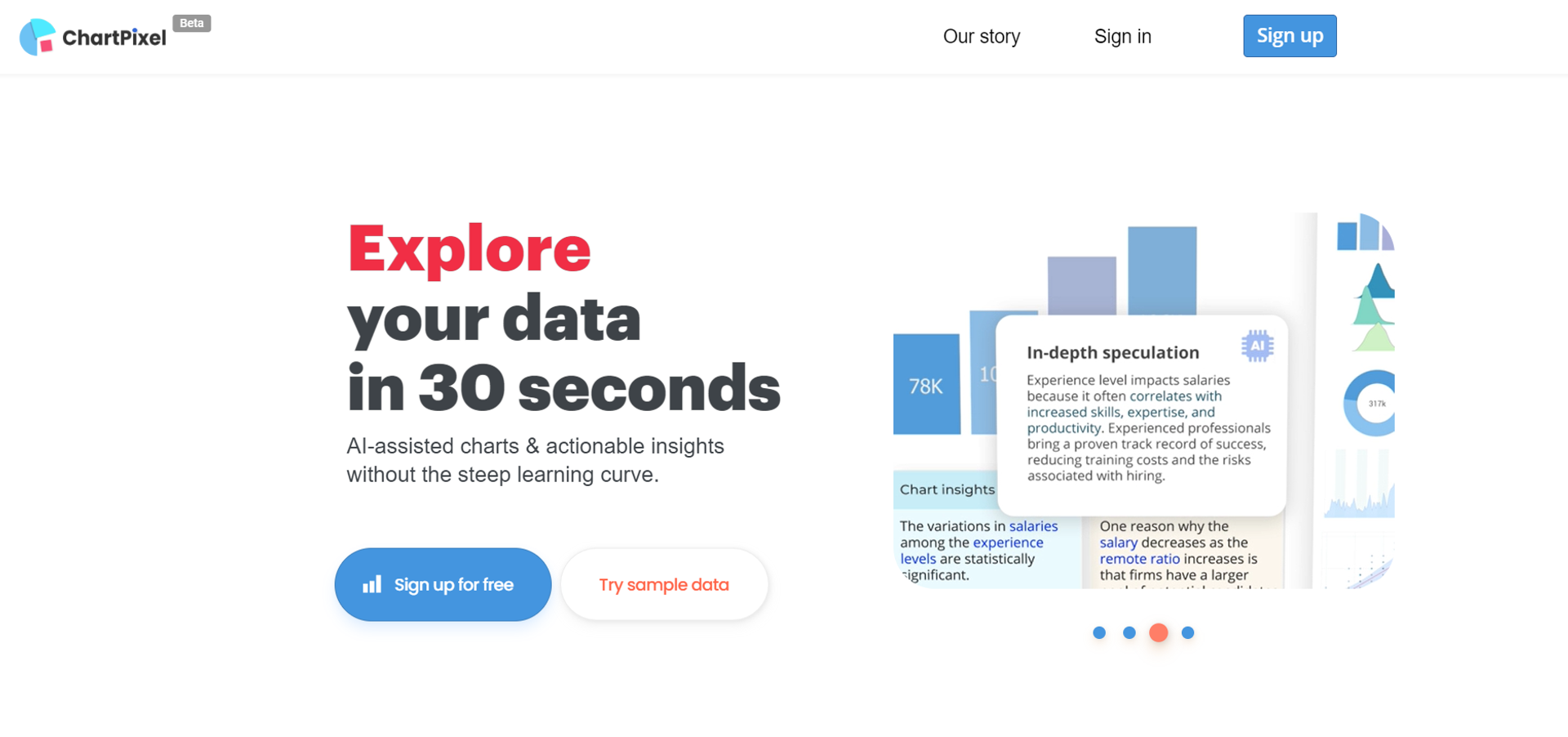
Strengths
- Time-Saving: It significantly reduces the time spent on data visualization by automating the creation of charts and insights.
- Educational Tool: Serves as an educational platform for those new to data analysis, eliminating the need to learn complex software or coding.
- Presentation-Ready Output: Charts and insights can be exported directly into presentation formats like PowerPoint, streamlining the workflow from data to delivery.
- No Data Expertise Required: ChartPixel is designed to be intuitive, allowing users with little to no data analysis background to generate and understand data visualizations.
Limitations
- Beta Stage Limitations: Being in a beta phase, users might encounter certain limitations in features or occasional bugs that are typically addressed as the tool evolves.
- Dependence on AI Interpretation: The insights generated are AI-driven, which may not always align with the user's specific analytical perspective or needs.
- Learning Curve for Advanced Features: While the tool is user-friendly, some users may require time to fully utilize its more advanced features and capabilities.
Building your AI toolkit?
Save ChartPixel and 1,000+ tools — free with Google, no spam
What You Get
Key Features
- AI-Assisted Chart Creation: ChartPixel uses artificial intelligence to automatically select the most relevant data columns and chart types, providing meaningful visualizations with minimal user input.
- User-Friendly Interface: The platform boasts an intuitive interface that caters to users of all skill levels, ensuring that data analysis is accessible and not daunting.
- Smart Data Cleaning: It takes the hassle out of preprocessing by cleaning messy data and engineering new features for a comprehensive analysis.
- Insightful Annotations: With AI-assisted annotations and statistics, ChartPixel not only presents data visually but also explains it, making patterns and trends easier to grasp.
- Versatile Data Input Options: ChartPixel allows users to upload data from various sources, including Excel, CSV files, and even directly from webpages via keyword searches or URLs.
- ProsTime-Saving: It significantly reduces the time spent on data visualization by automating the creation of charts and insights.Educational Tool: Serves as an educational platform for those new to data analysis, eliminating the need to learn complex software or coding.Presentation-Ready Output: Charts and insights can be exported directly into presentation formats like PowerPoint, streamlining the workflow from data to delivery.No Data Expertise Required: ChartPixel is designed to be intuitive, allowing users with little to no data analysis background to generate and understand data visualizations.ConsBeta Stage Limitations: Being in a beta phase, users might encounter certain limitations in features or occasional bugs that are typically addressed as the tool evolves.Dependence on AI Interpretation: The insights generated are AI-driven, which may not always align with the user's specific analytical perspective or needs.Learning Curve for Advanced Features: While the tool is user-friendly, some users may require time to fully utilize its more advanced features and capabilities.
Best For
- Students and Educators: Utilizing the tool to learn and teach data analysis without prior coding knowledge.
- Business Analysts: Employing ChartPixel to quickly translate business data into actionable insights.
- Researchers: Leveraging the platform's robust statistical methods for academic studies.
- Journalists and Editors: Using ChartPixel to enhance articles with data-driven charts and visualizations.
- Uncommon Use Cases: Hobbyists analyzing sports statistics or personal collections; Non-profits streamlining report generation for stakeholders.
Integrations
File Format Support: Accepts common data file types such as Excel and CSV. Web Data Extraction: Capable of interpreting and visualizing data directly from webpages. Presentation Software Compatibility: Exports visualizations and insights directly into presentation-friendly formats. Statistical Analysis: Integrates robust statistical methods to back up its visualizations and insights.
Similar Tools

Weekly Issue
⚡
Research tools · weekly digest
The AI Weekly — free in your inbox
New AI tools, pricing changes, expert picks, and hidden gems — curated by Mr. Spark every week. Join 5,000+ readers who stay ahead of the AI curve.
No spam, ever
Unsubscribe anytime
100% free