
Pricing Details
Free Access: 2 Pro generations per day and unlimited Lite generations (both with watermarks). Supporter: $12 per month. Get 120 Pro credits for top-quality images, unlimited Lite image generation, no ads or watermarks, and no attribution needed—though generated images remain public. Professional: $24 per month. Includes 250 Pro credits, private image generation, fastest processing, unlimited Lite images, no ads, no attribution, and early access to new features. Enterprise: Custom pricing. Designed for teams needing fully customizable models, custom integrations, high-volume usage, API access, and dedicated support. Disclaimer: Please note that pricing information may not be up to date. For the most accurate and current pricing details, refer to the official Craiyon website.
Product Visuals (1 images)
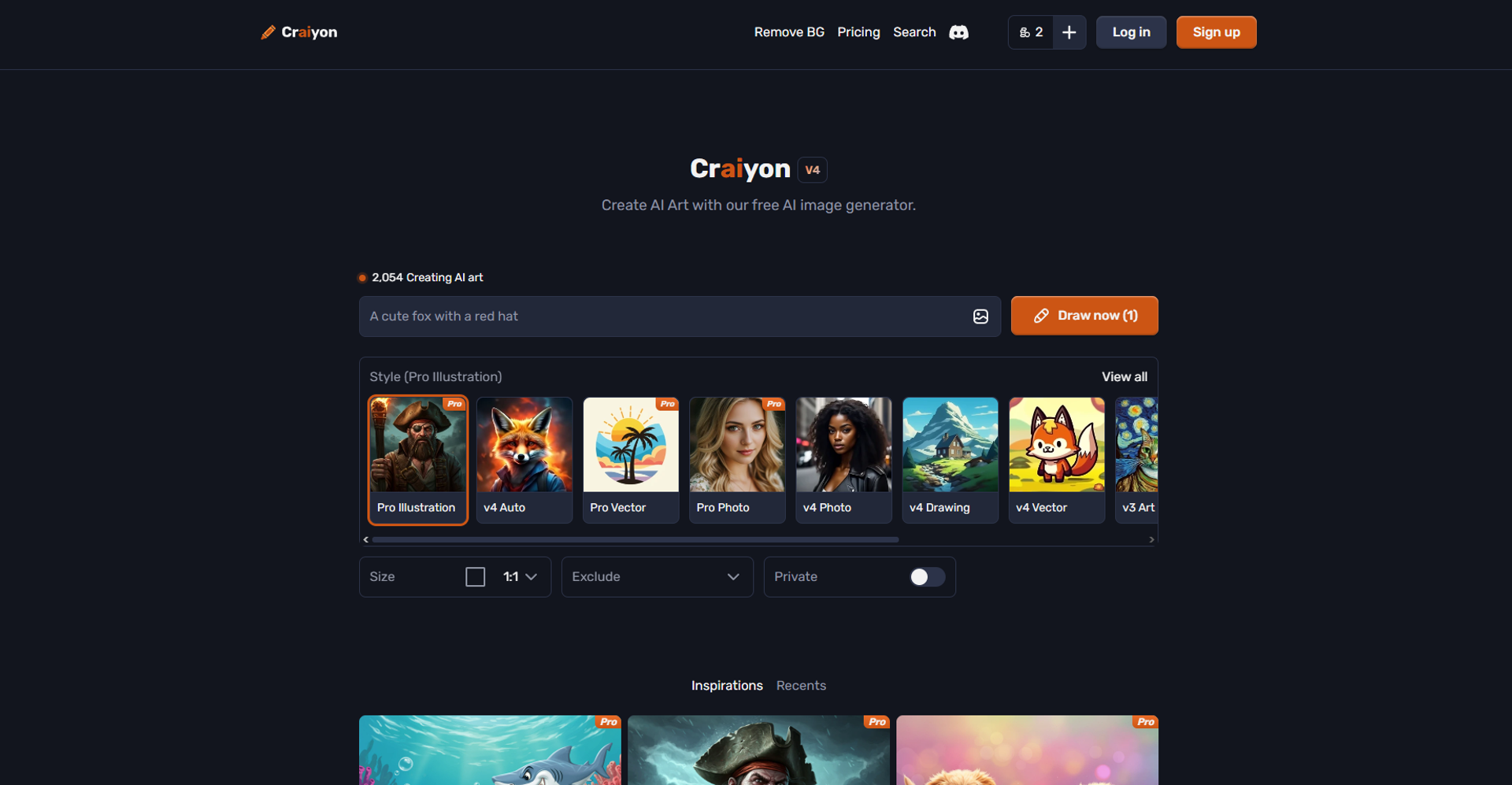
Strengths
- Creative Freedom: Offers users the ability to explore a wide range of artistic ideas with minimal effort.
- Cost-Effective: Provides a free tier, making it accessible to anyone interested in AI-generated art.
- Educational Tool: Useful for educators looking to demonstrate the capabilities of AI in creative processes.
- Inspiration Source: Acts as a catalyst for artists seeking new directions in their work.
Limitations
- Limited Output Quality: The generated images may not match professional standards in terms of resolution and detail.
- Dependence on Text Accuracy: The quality of the output heavily relies on the specificity and clarity of the input text.
What You Get
Key Features
- Text-to-Image Conversion: Craiyon excels in converting textual prompts into vivid images, offering endless possibilities for creativity.
- User-Friendly Interface: The tool features an intuitive design that makes it accessible to users of all skill levels.
- Diverse Style Options: Users can choose from a variety of artistic styles to tailor their images to specific preferences or project requirements.
- Rapid Generation: Craiyon generates images quickly, allowing users to explore multiple ideas without significant delays.
- ProsCreative Freedom: Offers users the ability to explore a wide range of artistic ideas with minimal effort.Cost-Effective: Provides a free tier, making it accessible to anyone interested in AI-generated art.Educational Tool: Useful for educators looking to demonstrate the capabilities of AI in creative processes.Inspiration Source: Acts as a catalyst for artists seeking new directions in their work.ConsLimited Output Quality: The generated images may not match professional standards in terms of resolution and detail.Dependence on Text Accuracy: The quality of the output heavily relies on the specificity and clarity of the input text.
Best For
- Graphic Designers: Using Craiyon for brainstorming and generating initial design concepts.
- Content Creators: Employing the tool to produce unique visuals for blog posts and digital content.
- Educators: Leveraging Craiyon as a teaching tool to illustrate AI capabilities in classrooms.
- Social Media Managers: Creating engaging visuals to enhance social media presence.
- Uncommon Use Cases: Utilized by novelists for visualizing story elements; Adopted by game developers for conceptualizing game art.
Similar Tools

Text to Image tools · weekly digest
The AI Weekly — free in your inbox
New AI tools, pricing changes, expert picks, and hidden gems — curated by Mr. Spark every week. Join 5,000+ readers who stay ahead of the AI curve.