
Pricing Details
Free: $0 per month; includes 1,500 words, 300 words per process, all modes and settings, no random words, and customer support. Lite: $19 per month; includes 20,000 words, 500 words per process, all modes and settings, continuous improvements, AI undetectability, clean output, and customer support. Standard: $29 per month; includes 50,000 words, unlimited words per process, free re-paraphrasing, all modes and settings, continuous improvements, AI undetectability, clean output, and customer support. Pro: $79 per month; includes 150,000 words, unlimited words per process, free re-paraphrasing, all modes and settings, continuous improvements, AI undetectability, clean output, and customer support. Disclaimer: Please note that pricing information may not be up to date. For the most accurate and current pricing details, refer to the official Humanize AI Pro website.
Product Visuals (1 images)
Strengths
- Simple and Accessible: The no-login interface makes it easy for anyone to start refining text in seconds, even without technical experience.
- Ideal for Non-Native Writers: Helps improve readability, fluency, and tone for users writing in a second language.
- Adaptable for Different Content Types: Works effectively for academic papers, blog posts, marketing copy, and more, giving users flexibility across formats.
- Developer Integration: The API supports automation within existing workflows, helping businesses and agencies process large volumes efficiently.
- Keyword Preservation: Refines text while maintaining core SEO elements, ensuring optimized yet natural-sounding output.
Limitations
- Ethical Ambiguity: While marketed as capable of bypassing AI detectors, the company’s ethical statement discourages misuse in academic or deceptive contexts, creating a gray area for users in regulated settings.
- Limited Fine-Tuning: The interface lacks granular customization options such as creativity sliders or per-sentence editing controls, which some advanced users may prefer.
Building your AI toolkit?
Save Humanize AI Pro and 1,000+ tools — free with Google, no spam
What You Get
Key Features
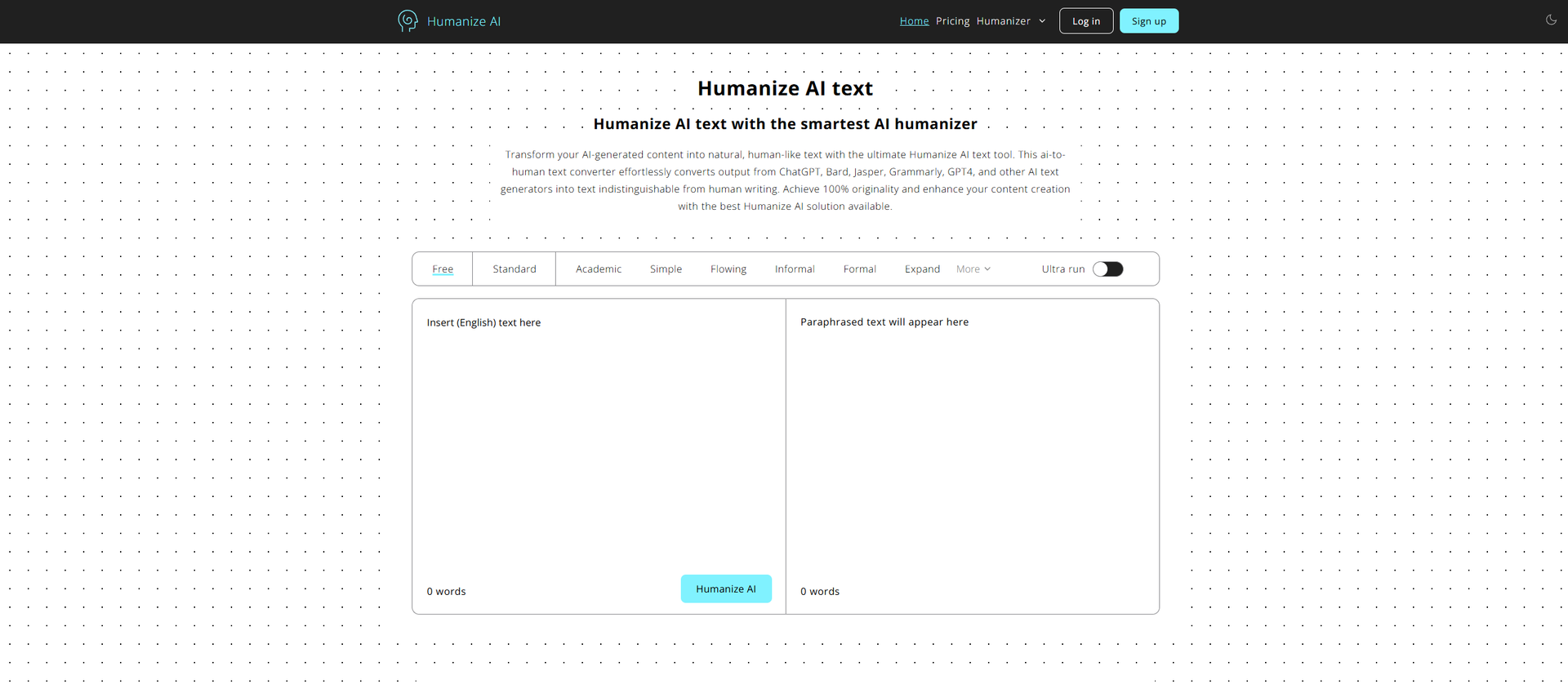
- AI-to-Human Conversion: Transforms AI-generated drafts into more organic writing, refining phrasing, structure, and flow while retaining the original context and intent.
- Multiple Modes and Tones: Offers a variety of presets such as Standard, Academic, Simple, Flowing, Informal, and Formal, with additional options like Expand, Shorten, and Ultra run for deeper rewriting.
- AI Detector Resistance: Focuses on reworking text in ways that make it less likely to be flagged by popular AI detectors, with higher-tier plans advertising “undetectable” results.
- Multilingual Functionality: Supports numerous languages, including English, Spanish, Chinese, Arabic, Russian, and Japanese, making it versatile for international users and multilingual teams.
- Browser-Based Accessibility: Operates directly within the browser without requiring an account for basic usage, allowing instant access and quick conversions.
- Humanizer API: Provides an API for developers to automate large-scale humanization tasks, offering queue management, job IDs, and rate-limited processing for enterprise use.
- ProsSimple and Accessible: The no-login interface makes it easy for anyone to start refining text in seconds, even without technical experience.Ideal for Non-Native Writers: Helps improve readability, fluency, and tone for users writing in a second language.Adaptable for Different Content Types: Works effectively for academic papers, blog posts, marketing copy, and more, giving users flexibility across formats.Developer Integration: The API supports automation within existing workflows, helping businesses and agencies process large volumes efficiently.Keyword Preservation: Refines text while maintaining core SEO elements, ensuring optimized yet natural-sounding output.ConsEthical Ambiguity: While marketed as capable of bypassing AI detectors, the company’s ethical statement discourages misuse in academic or deceptive contexts, creating a gray area for users in regulated settings.Limited Fine-Tuning: The interface lacks granular customization options such as creativity sliders or per-sentence editing controls, which some advanced users may prefer.
Best For
- Content Creators and Writers: Freelancers, bloggers, and journalists refining AI-generated drafts for more natural tone and clarity.
- Marketing and SEO Teams: Agencies and marketing professionals improving AI-generated product descriptions, ad copy, and email content while maintaining keyword integrity.
- Students and Academics: Users refining AI-assisted essays or reports to improve phrasing and readability while avoiding overly artificial language.
- Business and Legal Professionals: Teams using the tool to simplify technical or formal documents for better client communication.
- Developers and SaaS Teams: Companies integrating the API to automate the refinement of AI text across user-generated content or writing platforms.
- Uncommon Use Cases: Used by podcasters and video creators to humanize AI-generated scripts and by nonprofits to make donor stories sound more authentic and emotionally resonant.
Similar Tools

Writing Gen tools · weekly digest
The AI Weekly — free in your inbox
New AI tools, pricing changes, expert picks, and hidden gems — curated by Mr. Spark every week. Join 5,000+ readers who stay ahead of the AI curve.