
Pricing Details
Free: $0 per month. Includes free daily generations and limited access to KREA tools. Basic: $10 per month. Offers ~1,010 Flux images, ~36,000 real-time images, ~180 enhanced images, ~6 training jobs, and a commercial license. Pro: $35 per month. Includes ~5,048 Flux images, ~180,000 real-time images, ~900 enhanced images, ~30 training jobs, and a commercial license. Max: $60 per month. Provides ~15,142 Flux images, ~540,000 real-time images, ~2,700 enhanced images, ~90 training jobs, and a commercial license. Disclaimer: Please note that pricing information may not be up to date. For the most accurate and current pricing details, refer to the official Krea website.
Product Visuals (1 images)
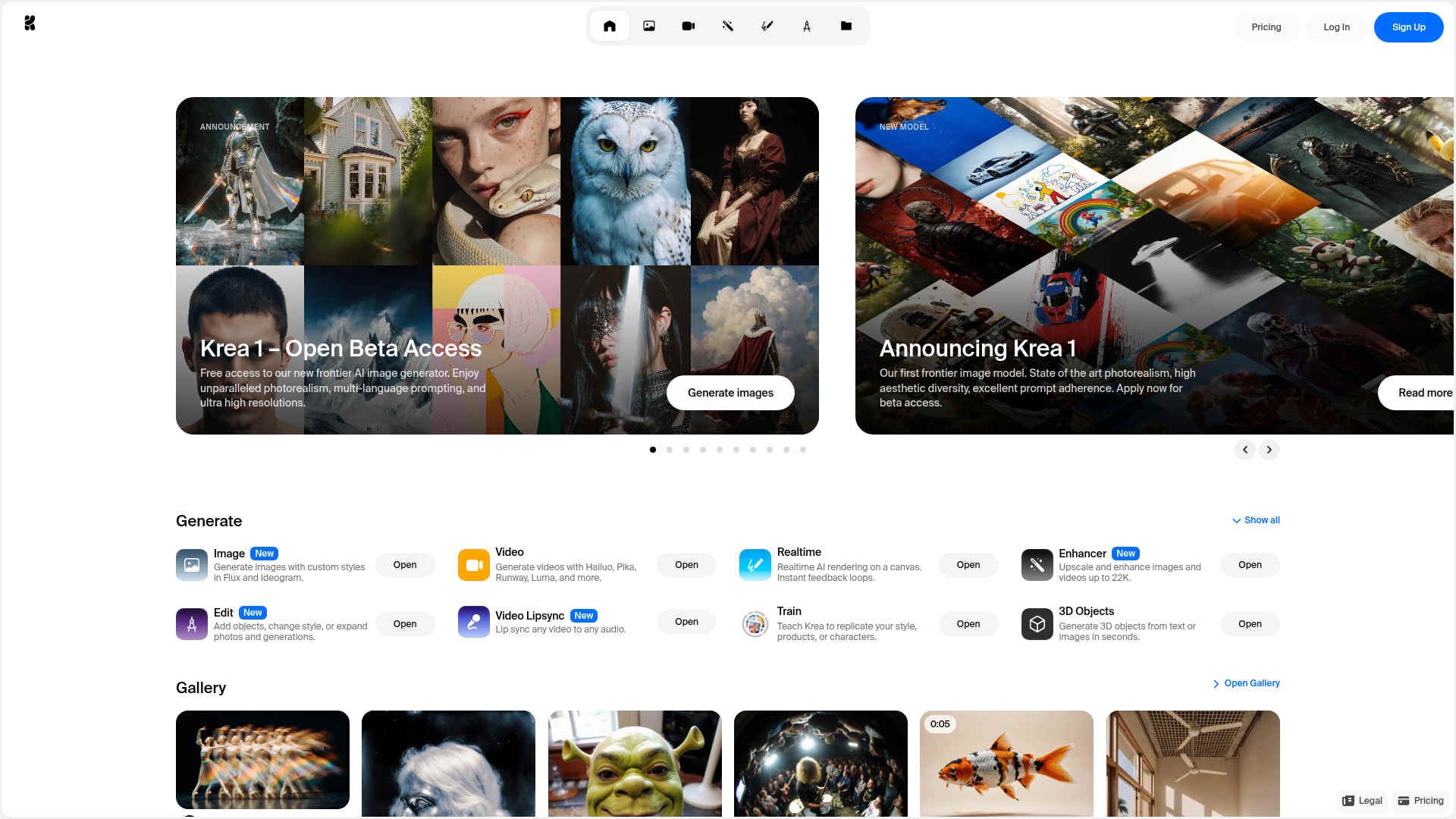
Strengths
- Versatile Image and Video Tools: From generating images to editing and upscaling videos, Krea offers a wide array of tools for various creative needs.
- High Resolution Outputs: Capable of upscaling images to 22K resolution, ensuring high-quality outputs for any project.
- Innovative Use of AI: Integrates with ChatGPT for visual compositing, enhancing user creativity and workflow.
- Open Beta Access: Users can try out Krea's new features and models with free access, allowing them to explore its capabilities without upfront costs.
Limitations
- Beta Limitations: As it's currently in open beta, some features might be unstable or under development.
- Learning Curve for New Users: The array of features might be overwhelming for beginners, requiring time to explore and master.
- Limited Integration: While powerful, it may not yet support all third-party applications or existing workflows.
What You Get
Key Features
- Photorealistic Image Generation: Krea excels in creating stunningly realistic images with multi-language prompting and ultra-high resolutions.
- Advanced Editing Tools: With features like FLUX.1 Kontext, users can effortlessly edit images, modify generations, and integrate new elements.
- Lip-Syncing Capabilities: Bring characters to life by uploading a face and generating or recording voices for seamless lip-syncing.
- 3D Object Creation: Transform text or images into textured 3D meshes quickly, offering new dimensions to creative projects.
- ProsVersatile Image and Video Tools: From generating images to editing and upscaling videos, Krea offers a wide array of tools for various creative needs.High Resolution Outputs: Capable of upscaling images to 22K resolution, ensuring high-quality outputs for any project.Innovative Use of AI: Integrates with ChatGPT for visual compositing, enhancing user creativity and workflow.Open Beta Access: Users can try out Krea's new features and models with free access, allowing them to explore its capabilities without upfront costs.ConsBeta Limitations: As it's currently in open beta, some features might be unstable or under development.Learning Curve for New Users: The array of features might be overwhelming for beginners, requiring time to explore and master.Limited Integration: While powerful, it may not yet support all third-party applications or existing workflows.
Best For
- Digital Artists: Leveraging Krea for creating detailed and high-quality digital art.
- Video Producers: Utilizing video restyling and enhancement tools to create unique visual content.
- 3D Modelers: Employing the 3D object generation feature for rapid prototyping and design.
- Marketing Professionals: Crafting visually appealing campaigns with the help of AI-driven image generation.
- Uncommon Use Cases: Used by architects for visualizing designs in 3D; adopted by educators to demonstrate AI's potential in creative fields.
Similar Tools
Image Gen tools · weekly digest
The AI Weekly — free in your inbox
New AI tools, pricing changes, expert picks, and hidden gems — curated by Mr. Spark every week. Join 5,000+ readers who stay ahead of the AI curve.