
Pricing Details
Free: $0 per month; includes unlimited docs and apps, 8 GB RAM with 2 vCPU, $5 monthly AI credits, Livedocs Anywhere (local use), and email and Discord support. Pro: $30 per workspace per month plus $20.00 per additional member; includes 32 GB RAM with 4 vCPU, unlimited members, real-time collaboration, scheduled runs, terminal access, data integrations (Snowflake, Databricks, BigQuery), and multi-platform notifications. Custom: Custom pricing; includes on-premise deployment, SSO and custom authentication, custom machine profiles, dedicated support and onboarding, and data project consulting. Book a demo with the sales team to see all pricing options. Disclaimer: Please note that pricing information may not be up to date. For the most accurate and current pricing details, refer to the official LiveDocs website.
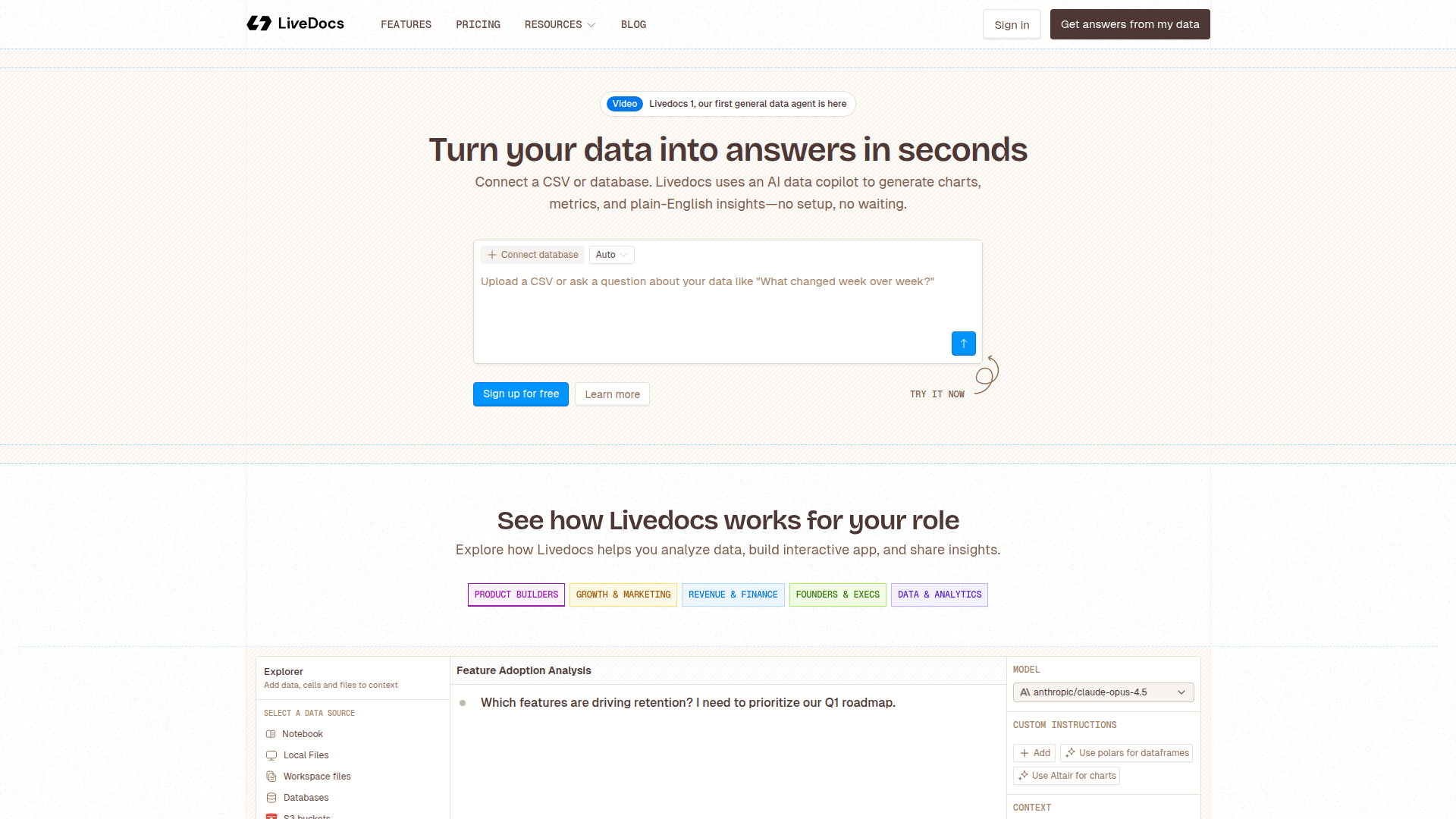
Product Visuals (1 images)
Strengths
- Unified workflow: Analysis, visualization, AI assistance, and app sharing live in one workspace instead of being spread across separate BI, notebook, and dashboard tools.
- Strong free tier: Unlimited documents and apps plus included AI credits give individuals and small teams plenty of room to experiment before paying.
- Performance minded stack: Use of Polars and DuckDB keeps exploratory work and ad hoc queries responsive even on sizeable datasets.
- Code friendly yet AI assisted: Data practitioners keep full SQL and Python control while using AI to draft queries, explain logic, or repair failing code.
Limitations
- Early stage ecosystem: Compared with long standing BI suites, LiveDocs has a smaller ecosystem and fewer “traditional enterprise” add ons and integrations.
- Skill expectations: Non technical business users can ask AI questions, but the workspace still rewards teams with at least basic SQL or Python literacy.
- Cloud centric model: Teams with strict on premises requirements may find the hosted approach limiting until deeper self hosted or private deployment options appear.
What You Get
Key Features
- AI data agent for “ask then analyze”: An integrated agent sits on top of CSVs, spreadsheets, and databases, using tools like DuckDB, web search, and a terminal to answer questions, transform data, and explain results in plain language.
- SQL, Python, and AI in one IDE: LiveDocs lets users write SQL and Python side by side, call AI to fix or generate code, and pass data between cells for exploratory analysis, modeling, and visualization in a single notebook style document.
- High performance data engine: Under the hood it favors fast technologies like Polars DataFrames and DuckDB queries, giving noticeably quick feedback on large datasets compared with many browser based BI tools.
- Interactive apps and sharing: Any notebook can be turned into an interactive app where stakeholders see inputs, filters, and charts while the code stays hidden, making it easier to ship live dashboards instead of static screenshots.
- ProsUnified workflow: Analysis, visualization, AI assistance, and app sharing live in one workspace instead of being spread across separate BI, notebook, and dashboard tools.Strong free tier: Unlimited documents and apps plus included AI credits give individuals and small teams plenty of room to experiment before paying.Performance minded stack: Use of Polars and DuckDB keeps exploratory work and ad hoc queries responsive even on sizeable datasets.Code friendly yet AI assisted: Data practitioners keep full SQL and Python control while using AI to draft queries, explain logic, or repair failing code.ConsEarly stage ecosystem: Compared with long standing BI suites, LiveDocs has a smaller ecosystem and fewer “traditional enterprise” add ons and integrations.Skill expectations: Non technical business users can ask AI questions, but the workspace still rewards teams with at least basic SQL or Python literacy.Cloud centric model: Teams with strict on premises requirements may find the hosted approach limiting until deeper self hosted or private deployment options appear.
Best For
- Data Analysts: Turning warehouse data into narratives with charts, tables, and explanatory text that can be shared as interactive apps.
- Data Scientists: Prototyping models, running experiments in Python, and documenting findings for mixed technical and non technical audiences.
- Product, Growth, and Marketing Teams: Running churn analyses, A/B test readouts, demand forecasts, and cohort deep dives without waiting on separate BI teams.
- Founders & Executives: Building quick KPI workspaces and investor friendly views that stay connected to live data instead of static decks.
- Uncommon Use Cases: Used by small analytics agencies to deliver client facing interactive reports instead of PDF exports; adopted by technical support or operations teams who need quick, ad hoc data tools without committing to a heavy BI deployment.
Similar Tools
AI Agents tools · weekly digest
The AI Weekly — free in your inbox
New AI tools, pricing changes, expert picks, and hidden gems — curated by Mr. Spark every week. Join 5,000+ readers who stay ahead of the AI curve.