
Pricing Details
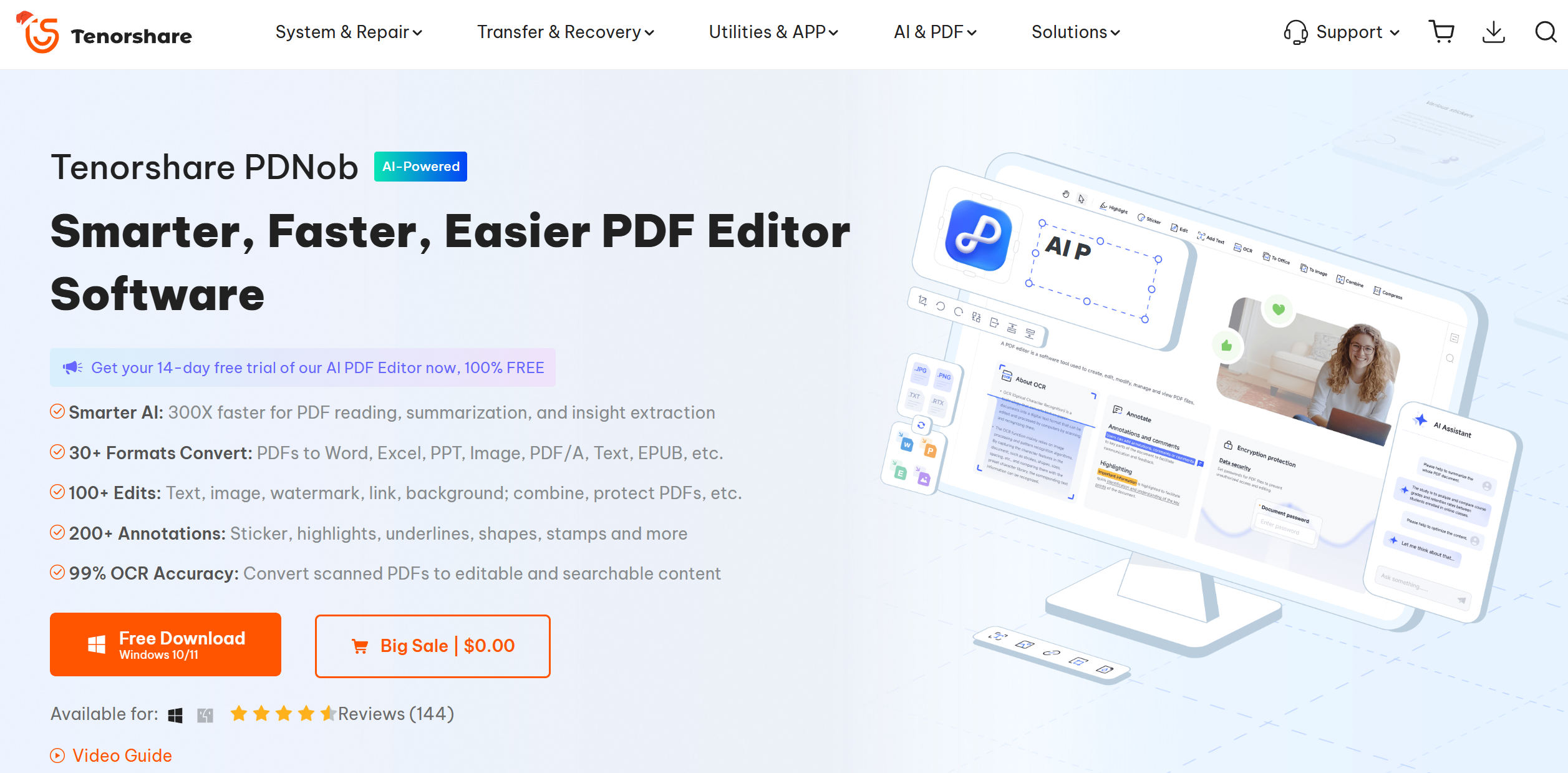
Free Trial: Offers a 14-day free trial of all features, includes 100 AI credits per month, no watermarks, and works on Windows & macOS. Auto-renews at $14.99/month after the trial. 1-Year License: Priced at $4.99/year (86% off). Includes 1200 AI credits/year, free updates, and no watermarks. Auto-renews at $35.99/year. 3-Year License: Priced at $45.99 for 3 years (50% off). Includes 3600 AI credits, free updates, and no watermarks. Auto-renews every 3 years. Disclaimer: Please note that pricing information may not be up to date. For the most accurate and current details, refer to the official PDNob PDF Editor website.
Product Visuals (1 images)
Strengths
- Enhanced Productivity: Streamlines workflows by enabling batch processing and multi-format conversion, saving time and effort.
- High OCR Accuracy: The AI-powered OCR feature provides reliable text recognition, making document management more efficient.
- User-Friendly Interface: Intuitive design allows users to navigate and utilize features with ease, regardless of technical expertise.
- Secure Document Handling: Offers 256-AES password encryption to protect sensitive documents, ensuring data privacy and security.
Limitations
- Initial Learning Curve: Some users may require time to explore and master all advanced features.
- Limited Free Version: The free trial includes watermarks on edited documents, which may be limiting for some users.
Building your AI toolkit?
Save PDNob PDF Editor and 1,000+ tools — free with Google, no spam
What You Get
Key Features
- AI-Driven OCR Technology: Achieve 99% accuracy in text recognition with Adaptive Document Recognition Technology (ADRT®), making scanned PDFs easily editable and searchable.
- Multi-Format Conversion: Convert PDFs to and from over 30 formats, including Word, Excel, PPT, and more, while retaining original formatting.
- Batch Processing: Handle large volumes of files with no limits on number or size, ensuring efficient workflow management.
- Comprehensive Editing Tools: Seamlessly edit text, images, links, watermarks, and backgrounds, maintaining the document's original design integrity.
- ProsEnhanced Productivity: Streamlines workflows by enabling batch processing and multi-format conversion, saving time and effort.High OCR Accuracy: The AI-powered OCR feature provides reliable text recognition, making document management more efficient.User-Friendly Interface: Intuitive design allows users to navigate and utilize features with ease, regardless of technical expertise.Secure Document Handling: Offers 256-AES password encryption to protect sensitive documents, ensuring data privacy and security.ConsInitial Learning Curve: Some users may require time to explore and master all advanced features.Limited Free Version: The free trial includes watermarks on edited documents, which may be limiting for some users.
Best For
- Educational Institutions: Facilitates learning by allowing teachers and students to edit and annotate PDF materials.
- Healthcare Providers: Streamlines documentation processes, ensuring efficient management of patient records.
- Financial Services: Enhances security and compliance by managing digitized financial data and contracts.
- Real Estate Professionals: Expedites document processing for faster deal closures and improved client interactions.
- Uncommon Use Cases: Utilized by software developers for documentation and code review; adopted by legal professionals for contract analysis and annotation.
Similar Tools
Students tools · weekly digest
The AI Weekly — free in your inbox
New AI tools, pricing changes, expert picks, and hidden gems — curated by Mr. Spark every week. Join 5,000+ readers who stay ahead of the AI curve.