
Pricing Details
Free: Radiant is available at no cost, making it accessible for anyone looking to enhance their productivity. Disclaimer: Please note that pricing information may not be up to date. For the most accurate and current pricing details, refer to the official Radiant website.
Product Visuals (1 images)
Strengths
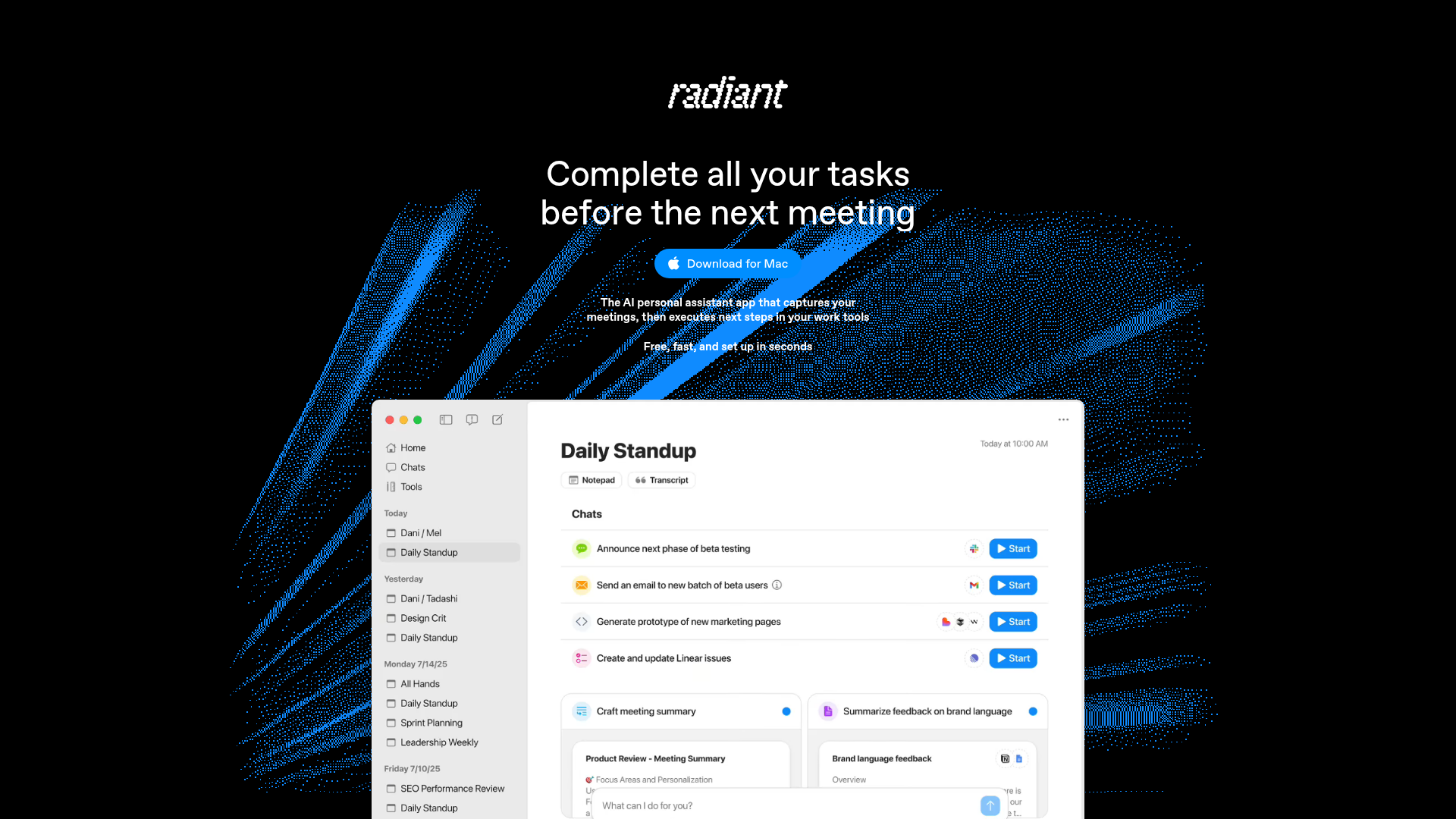
- Time Efficiency: Radiant completes tasks almost instantly, allowing you to focus on more important activities.
- User-Friendly Setup: The app is free, fast, and installs in seconds, getting you started without a steep learning curve.
- Enhanced Productivity: By automating follow-up tasks, Radiant reduces the need for manual input, boosting overall efficiency.
- Wide Compatibility: Works seamlessly with popular work tools, making it a versatile choice for professionals.
Limitations
- Mac-Only Availability: Currently, Radiant is available only for M1 Macs or later, which limits its accessibility for Windows or older Mac users.
- Beta Language Processing: English language processing is still in the beta phase, which might affect its performance in non-English contexts.
What You Get
Key Features
- AI-Driven Meeting Capture: Radiant automatically records meeting details and suggests actionable steps, ensuring nothing slips through the cracks.
- Instant Execution: The app drafts documents, emails, and more, connecting with your favorite tools to get tasks done swiftly.
- Background Operation: Radiant runs silently and unobtrusively, capturing meetings without needing a bot, allowing users to focus on the conversation.
- Cross-Tool Integration: It integrates with a variety of work tools, making it easy to send updates and drafts across platforms.
- ProsTime Efficiency: Radiant completes tasks almost instantly, allowing you to focus on more important activities.User-Friendly Setup: The app is free, fast, and installs in seconds, getting you started without a steep learning curve.Enhanced Productivity: By automating follow-up tasks, Radiant reduces the need for manual input, boosting overall efficiency.Wide Compatibility: Works seamlessly with popular work tools, making it a versatile choice for professionals.ConsMac-Only Availability: Currently, Radiant is available only for M1 Macs or later, which limits its accessibility for Windows or older Mac users.Beta Language Processing: English language processing is still in the beta phase, which might affect its performance in non-English contexts.
Best For
- Product Managers: Utilizing Radiant for efficient task management post-meetings.
- Engineers: Employing the app to streamline technical documentation and updates.
- Sales Professionals: Leveraging Radiant to manage follow-ups and client communications.
- Project and Account Managers: Using it for seamless coordination and task execution within teams.
- Uncommon Use Cases: Adopted by freelance writers for drafting quick content; Used by small startups for managing team collaborations effortlessly.
Similar Tools

Weekly Issue
⚡
Personal Assistant tools · weekly digest
The AI Weekly — free in your inbox
New AI tools, pricing changes, expert picks, and hidden gems — curated by Mr. Spark every week. Join 5,000+ readers who stay ahead of the AI curve.
No spam, ever
Unsubscribe anytime
100% free