
Pricing Details
Free Tier: SeaArt AI offers a free version for users to experience basic functionalities. Enterprise Tier: Tailored plans for businesses with advanced needs and higher volume demands. Disclaimer: For the most accurate and current pricing details, refer to the official SeaArt AI website.
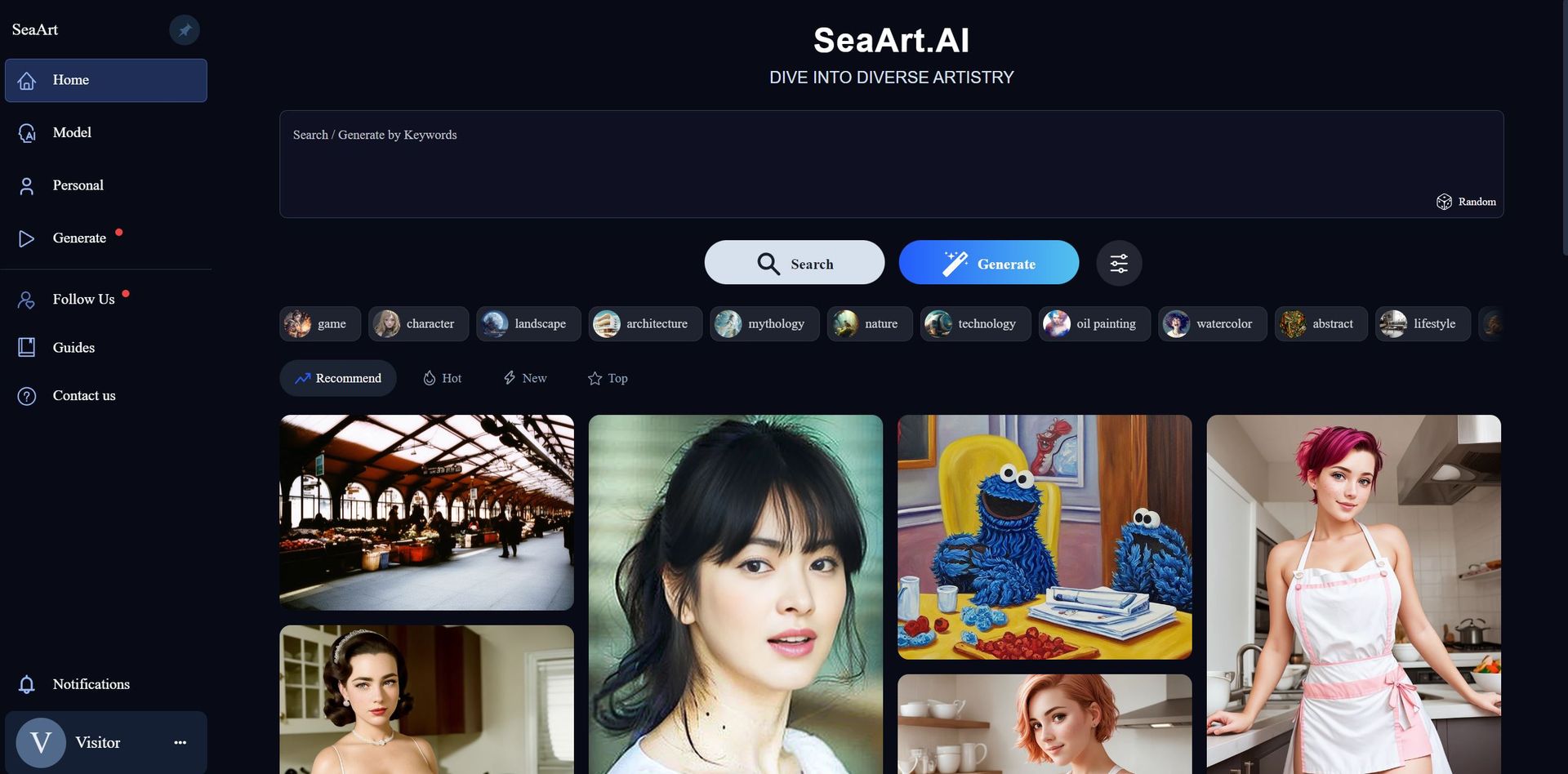
Product Visuals (1 images)
Strengths
- Creativity at Scale: Enables the creation of a wide array of art styles quickly and efficiently.
- Time-Saving: Automates the design process, cutting down the time spent on manual drawing or editing.
- Cost-Effective: Reduces the need for hiring multiple artists for different art styles.
- High-Quality Output: Produces high-definition artwork suitable for professional use.
Limitations
- Learning Curve: New users may need time to get accustomed to the range of features and tools.
- Over-Reliance on AI: May limit the development of individual artistic skills.
- Specificity of Styles: Some users might find the predefined styles restrictive.
Building your AI toolkit?
Save SeaArt AI and 1,000+ tools — free with Google, no spam
What You Get
Key Features
- Diverse Art Styles: From realistic portraits to animated characters, SeaArt AI provides a plethora of styles to choose from.
- Enterprise Version: A robust option for businesses that require high-volume, high-quality art generation.
- AI-Driven Tools: Features such as AI makeup, face swap, portrait generation, and HD restoration.
- User-Friendly Interface: Intuitive design that allows for seamless navigation and art creation.
- Customizable Templates: Pre-designed templates that can be tailored to fit specific project needs.
- ProsCreativity at Scale: Enables the creation of a wide array of art styles quickly and efficiently.Time-Saving: Automates the design process, cutting down the time spent on manual drawing or editing.Cost-Effective: Reduces the need for hiring multiple artists for different art styles.High-Quality Output: Produces high-definition artwork suitable for professional use.ConsLearning Curve: New users may need time to get accustomed to the range of features and tools.Over-Reliance on AI: May limit the development of individual artistic skills.Specificity of Styles: Some users might find the predefined styles restrictive.
Best For
- Digital Artists: Utilizing SeaArt AI to explore new styles and expand their portfolios.
- Game Developers: Employing the tool to design characters and environments quickly.
- Graphic Designers: Using SeaArt AI to generate diverse elements for their design projects.
- Content Creators: Leveraging the tool to produce unique visuals for social media and marketing.
- Uncommon Use Cases: Educational institutions might use it as a teaching aid in art and design courses; hobbyists might adopt it for personal projects and experimentation.
Integrations
Platform Compatibility: SeaArt AI is designed to be accessible across various platforms, ensuring a broad user base. API Access: Offers API integration for businesses to incorporate SeaArt AI's functionalities into their own systems. Template Integration: Allows users to import and customize templates for specific projects. File Format Support: SeaArt AI supports multiple file formats, making it easy to export and use generated artwork across different mediums.
Similar Tools
Weekly Issue
⚡
Image Gen tools · weekly digest
The AI Weekly — free in your inbox
New AI tools, pricing changes, expert picks, and hidden gems — curated by Mr. Spark every week. Join 5,000+ readers who stay ahead of the AI curve.
No spam, ever
Unsubscribe anytime
100% free