
Pricing Details
Basic Plan: $8.99 per month. A solid intro tier for casual users—includes access to standard features with no extras. Good if you just want to test the waters without going all in. Pro Plan: $16.99 per month (discounted from $24.99). Includes 100 credits for AI music generation, 100 custom AI singers, 100 stem splitter credits, and unlimited AI cover generation. Fast downloads and priority support round it out for more serious creators. Enterprise Plan: $29.99 per month. For teams or high-volume users needing the full stack—includes everything in Pro, likely with extended limits and custom solutions. Contact required for full breakdown. Disclaimer: Please note that pricing information may not be up to date. For the most accurate and current pricing details, refer to the official Singify Vocal Remover website.
Product Visuals (1 images)
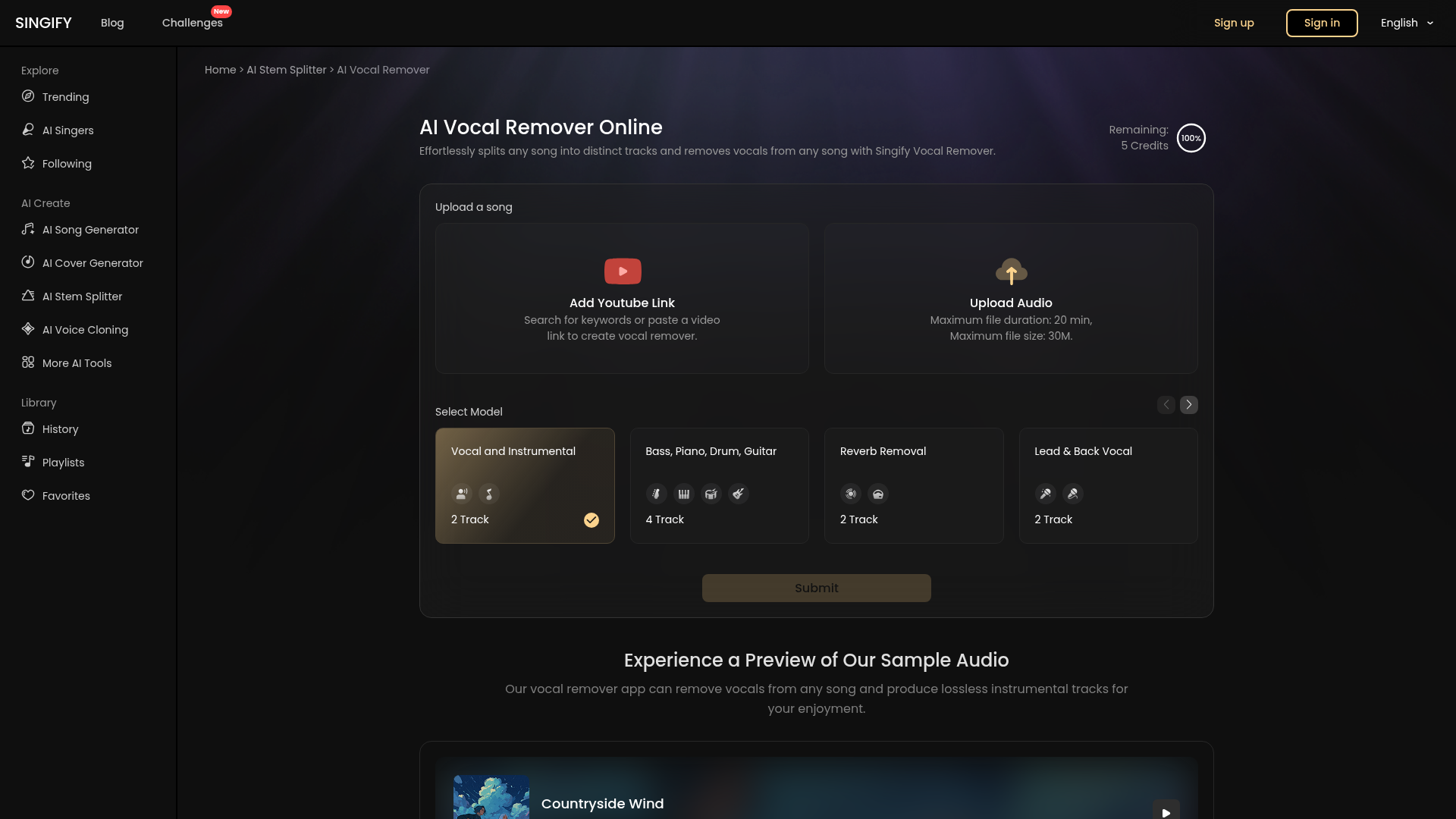
Strengths
- User-Friendly Interface: Easy to navigate, making it ideal for users of all skill levels.
- No Cost: Completely free to use, eliminating the need for paid subscriptions or hidden fees.
- Fast Processing: Delivers quick audio separation with minimal wait time.
- Regular Updates: Continuous AI model improvements enhance separation accuracy and performance.
Limitations
- Limited Advanced Controls: Lacks detailed parameter adjustments for professional users seeking more control over the separation process.
- Potential Quality Loss: Some high-frequency details may be lost during vocal removal, affecting the overall quality for studio-grade projects.
Building your AI toolkit?
Save Singify Vocal Remover and 1,000+ tools — free with Google, no spam
What You Get
Key Features
- AI-Powered Vocal Removal: Utilizes advanced AI models to accurately and quickly separate vocals from instrumentals, ensuring distortion-free output.
- Multi-Track Separation: Offers the ability to separate up to 10 different stems, including vocals, bass, piano, drums, and more, providing flexibility for remixing and editing.
- High-Quality Audio Output: Exports audio in multiple formats like MP3, WAV, and M4A, preserving the original sound quality.
- Cross-Platform Compatibility: Functions smoothly across all devices and browsers, including iOS, Android, macOS, and web platforms.
- ProsUser-Friendly Interface: Easy to navigate, making it ideal for users of all skill levels.No Cost: Completely free to use, eliminating the need for paid subscriptions or hidden fees.Fast Processing: Delivers quick audio separation with minimal wait time.Regular Updates: Continuous AI model improvements enhance separation accuracy and performance.ConsLimited Advanced Controls: Lacks detailed parameter adjustments for professional users seeking more control over the separation process.Potential Quality Loss: Some high-frequency details may be lost during vocal removal, affecting the overall quality for studio-grade projects.
Best For
- Karaoke Enthusiasts: Transform any song into a karaoke track for personal or group singing sessions.
- Aspiring Singers & Musicians: Use the tool to practice without vocal interference.
- Music Producers & Sound Designers: Isolate specific instruments for creative projects and remixes.
- DJs & Performers: Prepare instrumental tracks for live performances and mashups.
- Uncommon Use Cases: Employed by vocal coaches for training exercises; utilized by video creators to obtain background music without vocals.
Similar Tools

Music tools · weekly digest
The AI Weekly — free in your inbox
New AI tools, pricing changes, expert picks, and hidden gems — curated by Mr. Spark every week. Join 5,000+ readers who stay ahead of the AI curve.