
Pricing Details
Free Tier: One active workflow, up to 100 total URLs. Small Plan: $99 per month for five active workflows and up to 1,000 total URLs. Medium Plan: $299 per month for ten active workflows and up to 10,000 total URLs. Large Plan: $599 per month for 100 active workflows and up to 25,000 total URLs. Disclaimer: Please note that pricing information may not be up to date. For the most accurate and current pricing details, refer to the official Jsonify website.
Product Visuals (1 images)
Strengths
- Time Efficiency: Automates the entire data pipeline process, significantly reducing manual input and oversight.
- Cost-Effective: Lowers operational costs by eliminating the need for manual data entry and validation.
- User-Friendly Interface: The no-code dashboard ensures that even non-technical users can create and manage data pipelines effortlessly.
- Scalability: Handles large volumes of data across multiple sources, making it suitable for businesses of all sizes.
Limitations
- Initial Learning Curve: Some users may find it challenging to understand the full capabilities of the tool initially.
- Limited Free Plan: The free tier offers limited functionality, which may not be sufficient for larger projects.
What You Get
Key Features
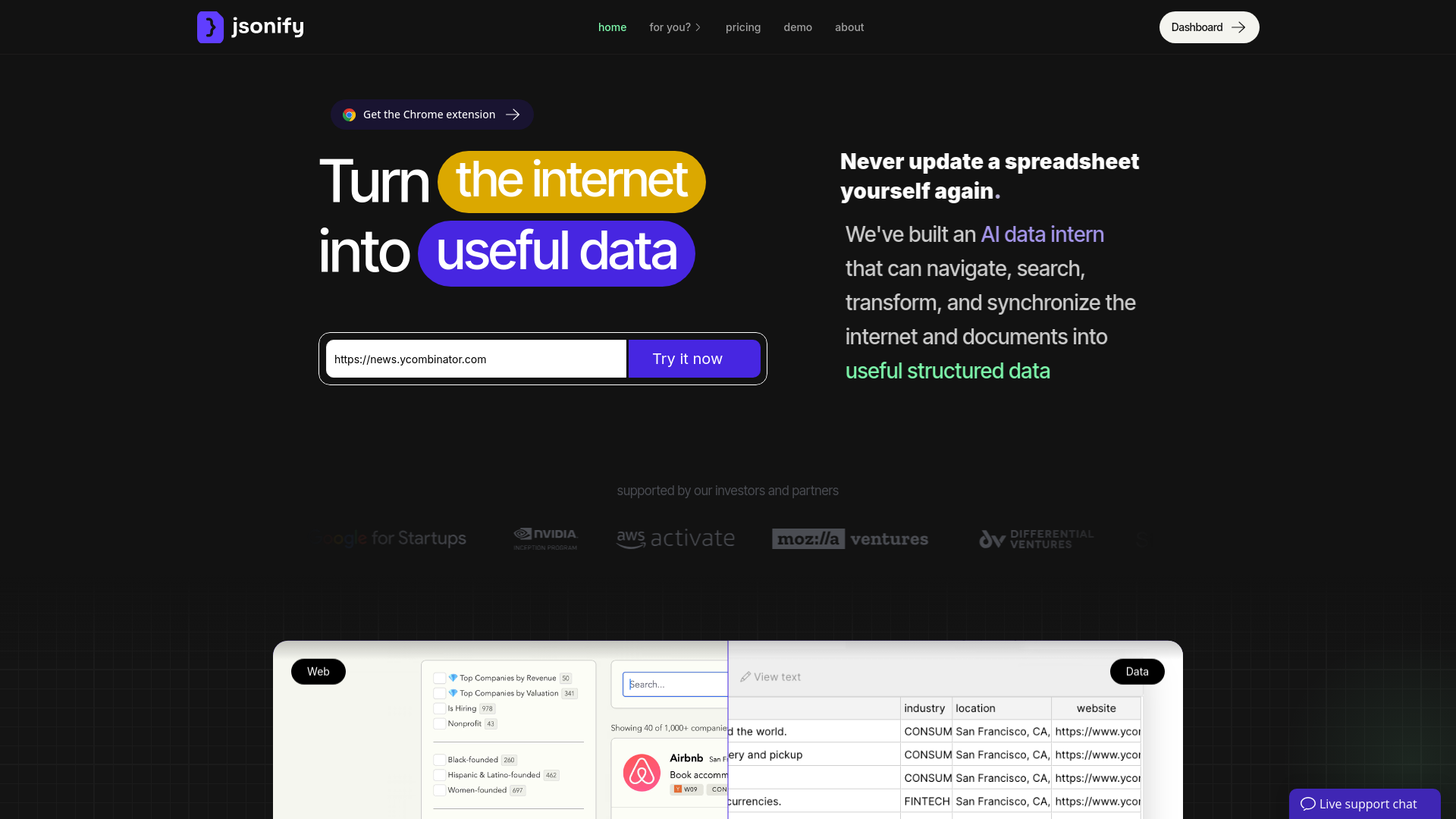
- Advanced AI Data Agents: Jsonify's AI agents can navigate, search, transform, and synchronize data from various sources, mimicking human understanding and interaction.
- No-Code Dashboard: Allows users to create complex data pipelines without any coding, making it accessible to non-technical users.
- Flexible Workflows: Supports the creation of diverse data tasks, from small-scale data extraction to large-scale data synchronization.
- Multi-Source Data Extraction: Capable of extracting structured data from thousands of different web pages and documents, regardless of layout or format.
- ProsTime Efficiency: Automates the entire data pipeline process, significantly reducing manual input and oversight.Cost-Effective: Lowers operational costs by eliminating the need for manual data entry and validation.User-Friendly Interface: The no-code dashboard ensures that even non-technical users can create and manage data pipelines effortlessly.Scalability: Handles large volumes of data across multiple sources, making it suitable for businesses of all sizes.ConsInitial Learning Curve: Some users may find it challenging to understand the full capabilities of the tool initially.Limited Free Plan: The free tier offers limited functionality, which may not be sufficient for larger projects.
Best For
- E-commerce Businesses: Utilizing the tool for automating product data extraction and synchronization.
- Digital Marketing Agencies: Employing the tool for gathering market and competitor data efficiently.
- Research Institutions: Leveraging the tool to collect and analyze large datasets from various online sources.
- Financial Analysts: Using Jsonify to automate the collection of financial data from multiple sources.
- Uncommon Use Cases: Adopted by educational institutions for teaching data science courses; utilized by freelance journalists for investigative research.
Integrations
Google Sheets Integration: Easily export data to Google Sheets for further analysis and reporting. Airtable Support: Seamlessly send data to Airtable, enhancing your database management. API Access: Developers can integrate Jsonify into more advanced workflows via API. Third-Party Integration: Supports a wide range of third-party tools for enhanced functionality.
Similar Tools
Weekly Issue
⚡
Workflows tools · weekly digest
The AI Weekly — free in your inbox
New AI tools, pricing changes, expert picks, and hidden gems — curated by Mr. Spark every week. Join 5,000+ readers who stay ahead of the AI curve.
No spam, ever
Unsubscribe anytime
100% free