
Pricing Details
Business: $69 per user per month. Includes AI features like call summaries, action items, email follow-ups, Retropilot, workflow automation, deal rooms, and notifications. Comes with Slack support and is built for automating CRM tasks and team collaboration. Transformation: $99 per user per month. Adds Executive Briefs and Ask Momentum for accounts on top of the Business plan, with premium support included for enhanced insights and leadership-ready summaries. Enterprise: Custom pricing. Offers everything in the Transformation plan plus SSO, white-glove onboarding, and professional services for AI and automation. Designed for large teams with advanced security and support needs. Add-On: Conversational Intelligence: $30 per user per month. Adds a note-taker and video library to any plan for better conversational insight. Startup Plan: 50% off Business or Transformation plans for companies with fewer than 10 reps. Requires contacting Momentum directly to apply. Disclaimer: For the most accurate and current pricing information, please visit the Momentum website.
Product Visuals (1 images)
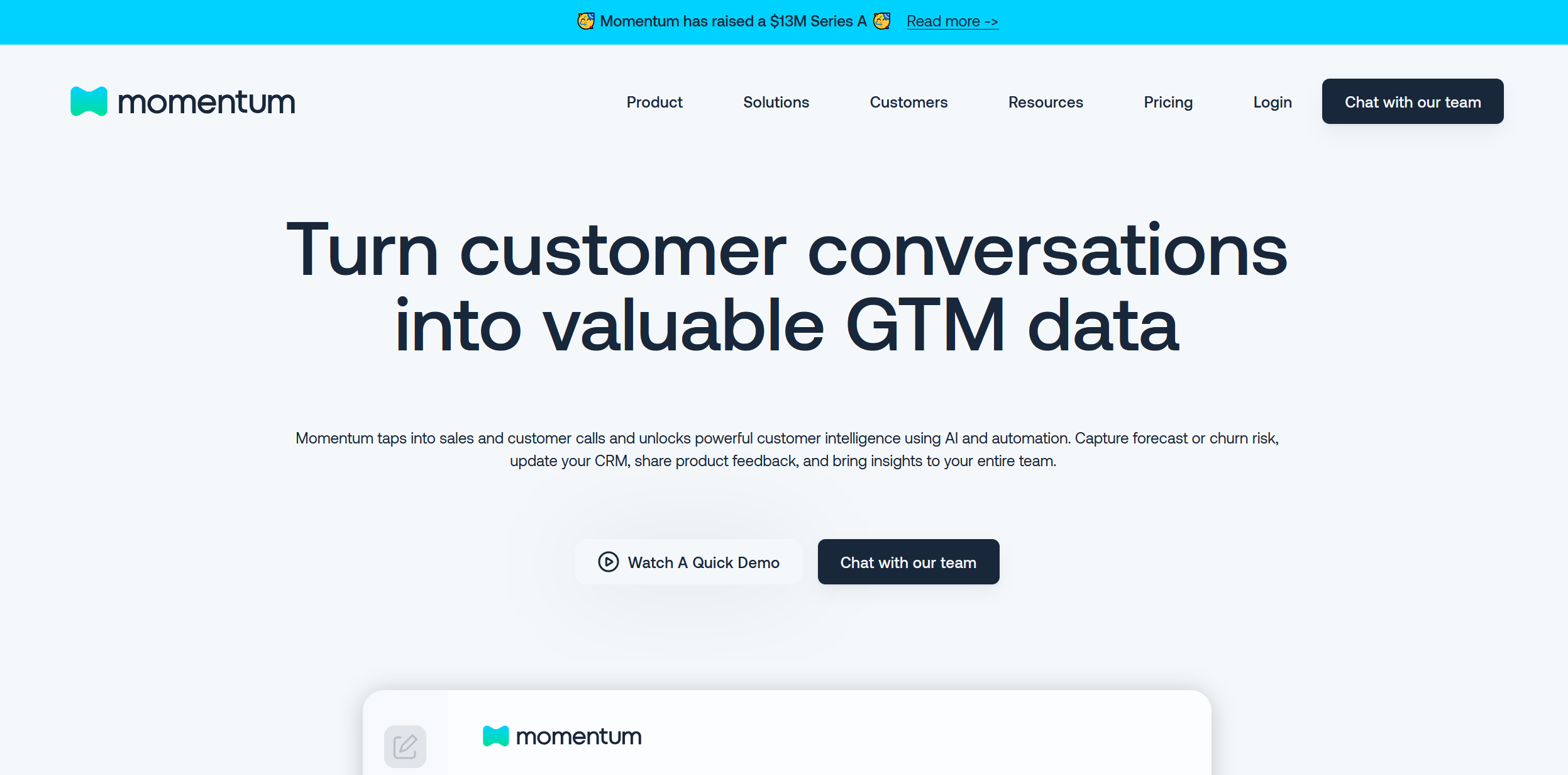
Strengths
- Enhanced Efficiency: Significantly cuts down the time spent on manual data entry and sales note-taking.
- Improved Data Accuracy: Ensures accurate and up-to-date sales data, which aids in better sales forecasting.
- Scalable Coaching Tools: Facilitates more manageable and scalable sales coaching through automated summaries and insights.
- Seamless Integrations: Integrates smoothly with popular tools like Slack and Salesforce, fitting well into existing workflows.
Limitations
- Learning Curve: New users may need some time to fully adapt to the tool’s comprehensive features.
- Dependency on Integrations: Optimal efficiency is achieved when used in conjunction with supported platforms like Slack or Salesforce.
- Cost Consideration for Small Teams: May represent a significant investment for smaller teams or startups.
What You Get
Key Features
- AI Call Notes: Automatically captures and organizes notes for every sales call, ensuring no detail is overlooked.
- CRM Integration: Syncs insights and updates directly into CRM systems like Salesforce, centralizing all sales data.
- Automated Workflows: Reduces administrative tasks, allowing sales teams to focus more on engaging prospects.
- Real-time Insights: Provides actionable insights to enhance decision-making and refine sales strategies.
- ProsEnhanced Efficiency: Significantly cuts down the time spent on manual data entry and sales note-taking.Improved Data Accuracy: Ensures accurate and up-to-date sales data, which aids in better sales forecasting.Scalable Coaching Tools: Facilitates more manageable and scalable sales coaching through automated summaries and insights.Seamless Integrations: Integrates smoothly with popular tools like Slack and Salesforce, fitting well into existing workflows.ConsLearning Curve: New users may need some time to fully adapt to the tool’s comprehensive features.Dependency on Integrations: Optimal efficiency is achieved when used in conjunction with supported platforms like Slack or Salesforce.Cost Consideration for Small Teams: May represent a significant investment for smaller teams or startups.
Best For
- Sales Leaders: Leverage the tool to enhance visibility and efficiency across every deal.
- Sales Representatives: Benefit from reduced manual administrative tasks, allowing more time for sales activities.
- Customer Success Managers: Use it to manage customer transitions and interactions more effectively.
- Revenue Operations Teams: Utilize AI insights to refine sales and operational strategies.
- Uncommon Use Cases: Non-profits streamline donor engagement; universities manage alumni relations and fundraising efforts.
Similar Tools
Workflows tools · weekly digest
The AI Weekly — free in your inbox
New AI tools, pricing changes, expert picks, and hidden gems — curated by Mr. Spark every week. Join 5,000+ readers who stay ahead of the AI curve.