
Pricing Details
Pro Annual Access - $14.99/month750 AI Credits/monthIncludes: PDF/PPT Export, Presentation Analytics, Sharing Link, Form Response Notifications, Slide & Speaker Notes, Tips & QA Generation 750 AI Credits/month Includes: PDF/PPT Export, Presentation Analytics, Sharing Link, Form Response Notifications, Slide & Speaker Notes, Tips & QA Generation Business Annual Access - $49.99/month1000 AI Credits/monthIncludes: All Pro features + Brand Features, Advanced Form Response, Webhook, Custom Domain, Team & Organization 1000 AI Credits/month Includes: All Pro features + Brand Features, Advanced Form Response, Webhook, Custom Domain, Team & Organization Disclaimer: Please note that pricing information may change. For the most accurate and current details, refer to the official Decktopus AI website. Explore: AI Tools for Students Low-Code/No-Code AI Tools AI Tools for Startups
Product Visuals (1 images)
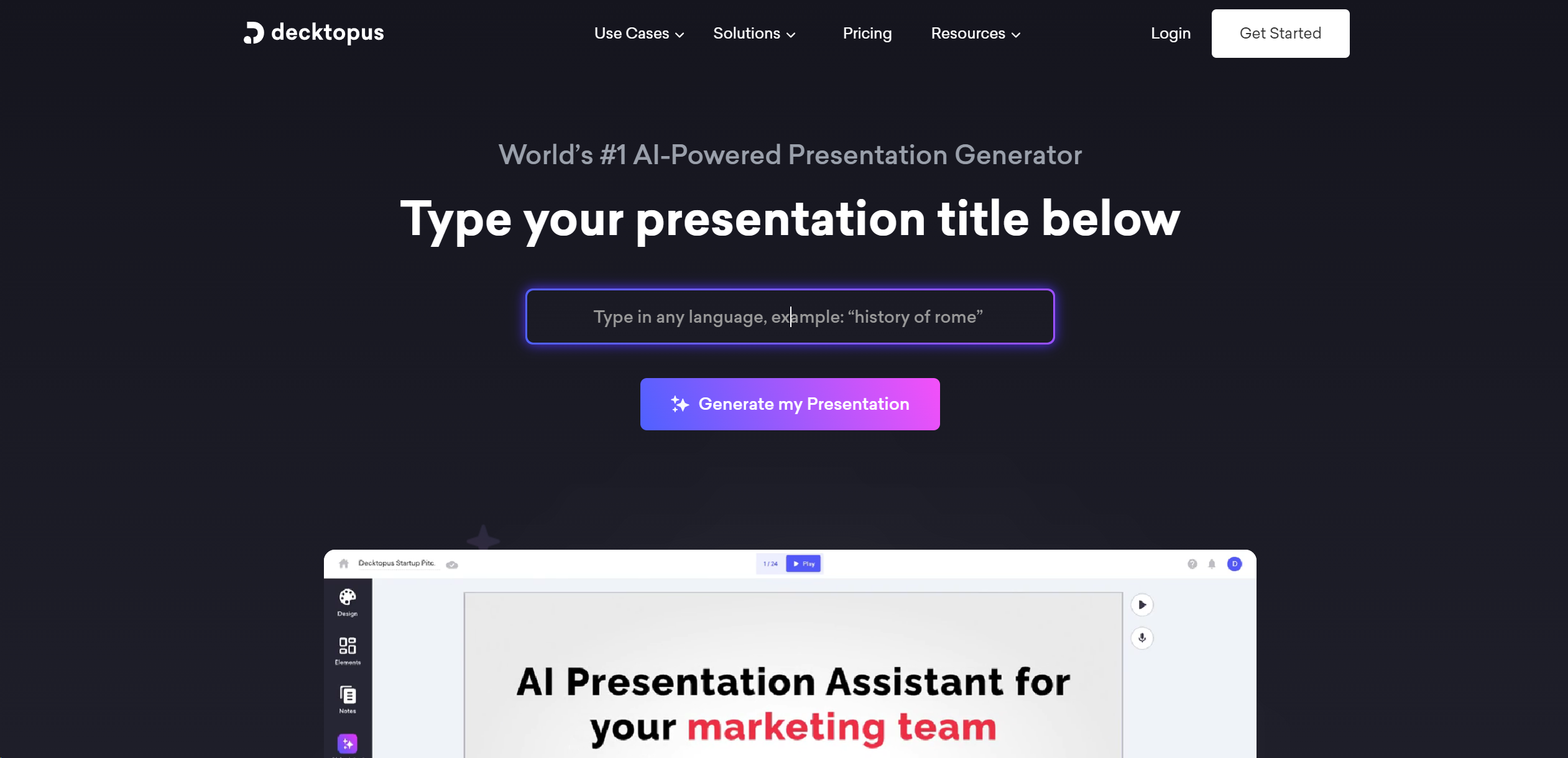
Strengths
- Significant Time Savings: Users report saving up to 64% of the time typically required to prepare presentations.
- High Customization: The ability to use custom layouts and a drag-and-drop editor allows for unique presentation designs.
- Enhanced Audience Interaction: Features like tailored Q&As and AI-generated images captivate and engage the audience.
- Rapid Support Response: Decktopus AI boasts an average customer support response time of less than 1 minute, ensuring user issues are addressed promptly.
Limitations
- Learning Curve: New users may need time to familiarize themselves with all the AI features and customization options.
- Internet Dependency: Being an online platform, a stable internet connection is required for uninterrupted access to Decktopus AI's features.
- Template Limitations: While the templates are modern and easily customizable, some users might find them less flexible for highly specialized or niche presentations.
Building your AI toolkit?
Save Decktopus AI and 1,000+ tools — free with Google, no spam
What You Get
Key Features
- AI-Powered Design: Decktopus AI employs advanced algorithms to automate the design process, generating visually appealing slides based on user input.
- Custom Layouts: Users can upload and utilize brand templates, ensuring consistency and reinforcing brand identity across presentations.
- Drag & Drop Editor: This feature offers ease of use, enabling users to edit presentations effortlessly with a user-friendly interface.
- AI Presenter Coach: An innovative AI-based tool that provides tips and tricks for effective presentation delivery, helping to alleviate stage fright.
- Dynamic Q&A Sessions: Tailored interactive Q&A sessions engage the audience, making presentations more interactive and engaging.
- ProsSignificant Time Savings: Users report saving up to 64% of the time typically required to prepare presentations.High Customization: The ability to use custom layouts and a drag-and-drop editor allows for unique presentation designs.Enhanced Audience Interaction: Features like tailored Q&As and AI-generated images captivate and engage the audience.Rapid Support Response: Decktopus AI boasts an average customer support response time of less than 1 minute, ensuring user issues are addressed promptly.ConsLearning Curve: New users may need time to familiarize themselves with all the AI features and customization options.Internet Dependency: Being an online platform, a stable internet connection is required for uninterrupted access to Decktopus AI's features.Template Limitations: While the templates are modern and easily customizable, some users might find them less flexible for highly specialized or niche presentations.
Best For
- Sales Professionals: For creating compelling sales presentations that convert.
- Marketing Managers: Employing the tool to craft engaging marketing pitches and proposals.
- Business Development Representatives (BDRs): Utilizing the platform to generate quick and effective pitch decks.
- Founders & Entrepreneurs: To pitch investors and communicate their business vision succinctly.
- Agencies: For designing visually stunning presentations for clients across various industries.
- Uncommon Use Cases: Educational institutions are adopting it for creating interactive teaching materials; Non-profits use it to communicate their impact stories more effectively.
Integrations
Similar Tools
Presentations tools · weekly digest
The AI Weekly — free in your inbox
New AI tools, pricing changes, expert picks, and hidden gems — curated by Mr. Spark every week. Join 5,000+ readers who stay ahead of the AI curve.