
Pricing Details
Free: $0.00 per month; includes 32 regular image credits per day, text-to-image, AI image generation features, background removal, preset consistent characters, and 10 MB asset library storage. Beginner: $8.99 per month; includes 900 fast image credits per month (up to 900 images), watermark removal, high-resolution exports, image edits, face fix, product background, image enhancement, and 10 GB asset library storage. Creator: $24.99 per month; includes 3,000 fast image credits per month, unlimited regular image credits, 3,000 video credits per month, high-resolution exports, AI video tools, chat editor access, consistent character creation, and 100 GB asset library storage. Master: $59.99 per month; includes unlimited fast image credits, 9,000 video credits per month, 60 private characters, concurrent training for 3 characters, 12 concurrent image jobs, 3 concurrent video jobs, and 100 GB asset library storage. Disclaimer: Please note that pricing information may not be up to date. For the most accurate and current pricing details, refer to the official Dzine AI website.
Product Visuals (1 images)
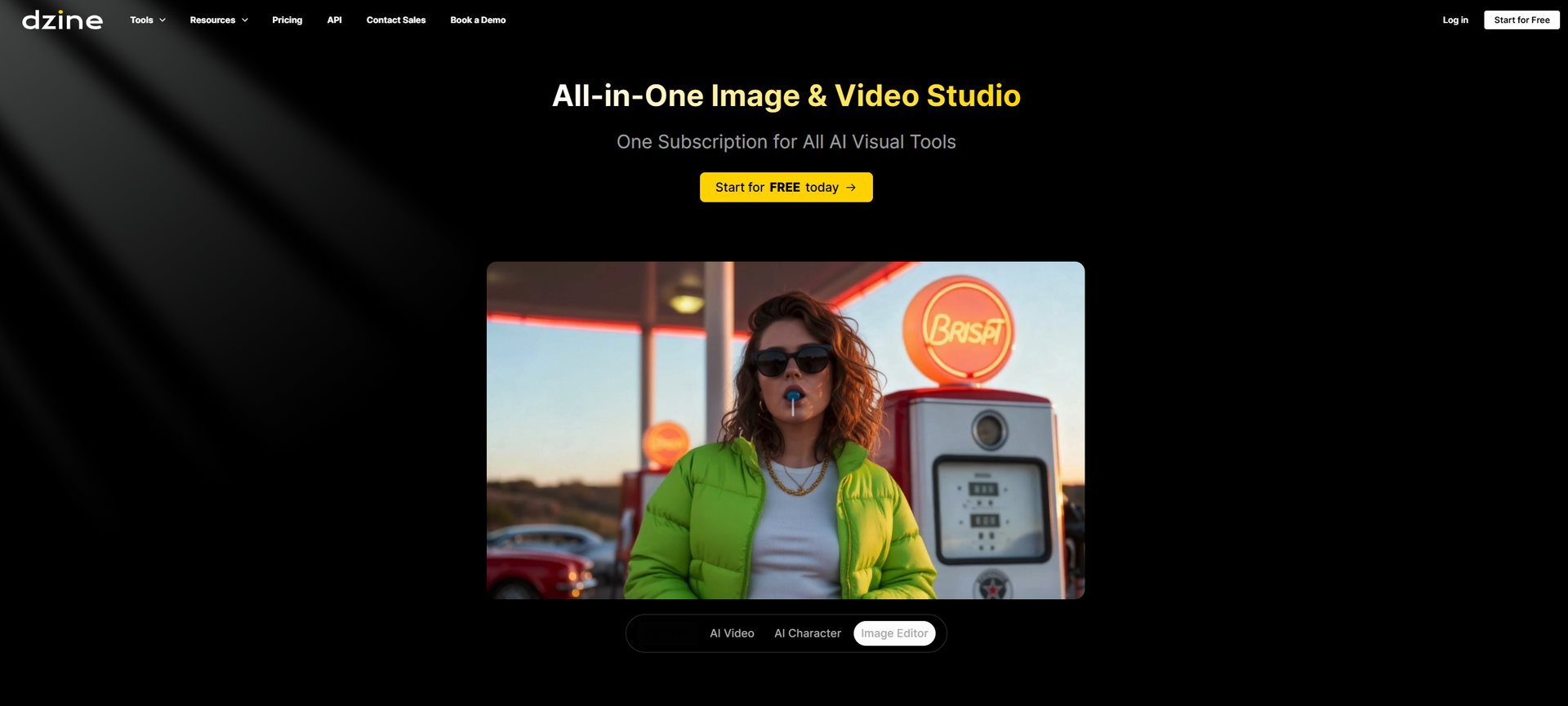
Strengths
- Layout Control: The layer-based canvas makes it easier to direct composition and placement before generating, which feels closer to real design work than prompt-only tools.
- All In One Studio: Image generation, video generation, and lip sync avatars live in the same workspace, so teams can keep a project moving without bouncing between apps.
- Beginner Friendly Results: Style presets and the prompt assistant help non-technical users get usable outputs faster, with less trial and error.
- Model Choice: Support for multiple underlying models gives creators flexibility to prioritize speed, detail, or a specific look depending on the task.
- Low Setup Overhead: Browser-based workflows mean most users can start creating on standard hardware without installs or a dedicated GPU machine.
Limitations
- Credits Can Go Fast: Video, lip sync, and higher-end models may burn through credits quickly for heavier production workloads.
- Generation Queues: During peak demand, longer or stalled video renders can slow down time-sensitive content schedules.
- Limited Native Integrations: Fewer direct connections to tools like Adobe apps, Figma, or social scheduling platforms can add manual export and upload steps.
What You Get
Key Features
- Layer Based Composition Canvas: Drag and drop objects as layers, position and resize them, sketch guides, and control the final layout before generating the AI render.
- Predefined Styles And Prompt Assistant: Curated style presets and the Dzine Assistant (built on GPT style tech) turn rough ideas into full prompts, reducing the need for prompt engineering skills.
- All In One Image And Video Generation: Supports text to image, image to image, text to video, and image to video, including story video maker flows and product focused ad templates.
- Lip Sync Avatars With Multi Person Support: Converts photos or boards into talking videos with natural lip sync and even multi speaker conversations in a single clip.
- Local Editing, Insert, Erase, And Enhance: Tools such as AI eraser, insert object, expand, face swap and repair, and one click Enhance clean up faces, hands, and artifacts without leaving the editor.
- High Resolution Export And Asset Library: Exports up to very high resolutions in PNG or JPG, offers PSD import or export on higher tiers, and includes an asset library for reusable layers, characters, and elements.
- ProsLayout Control: The layer-based canvas makes it easier to direct composition and placement before generating, which feels closer to real design work than prompt-only tools.All In One Studio: Image generation, video generation, and lip sync avatars live in the same workspace, so teams can keep a project moving without bouncing between apps.Beginner Friendly Results: Style presets and the prompt assistant help non-technical users get usable outputs faster, with less trial and error.Model Choice: Support for multiple underlying models gives creators flexibility to prioritize speed, detail, or a specific look depending on the task.Low Setup Overhead: Browser-based workflows mean most users can start creating on standard hardware without installs or a dedicated GPU machine.ConsCredits Can Go Fast: Video, lip sync, and higher-end models may burn through credits quickly for heavier production workloads.Generation Queues: During peak demand, longer or stalled video renders can slow down time-sensitive content schedules.Limited Native Integrations: Fewer direct connections to tools like Adobe apps, Figma, or social scheduling platforms can add manual export and upload steps.
Best For
- Graphic Designers and Illustrators: Using Dzine AI to concept characters, posters, and layouts while keeping layer based control similar to classic design apps.
- Marketing and Advertising Teams: Producing eye catching social assets, product shots, and short video ads without relying on large motion design teams.
- E commerce Brands and Product Sellers: Turning catalog images into lifestyle scenes, varied product backgrounds, and quick video ads for campaigns.
- Content Creators and Influencers: Creating avatars, thumbnails, story clips, and AI enhanced portraits for channels across major social platforms.
- Game and Animation Studios: Exploring character looks, environments, and storyboards while keeping consistent characters across scenes.
- Uncommon Use Cases: Used by educators to teach visual storytelling and prompt crafting in design or media courses; Adopted by indie tabletop RPG creators to build consistent character art, maps, and scene illustrations.
Similar Tools
Video Generators tools · weekly digest
The AI Weekly — free in your inbox
New AI tools, pricing changes, expert picks, and hidden gems — curated by Mr. Spark every week. Join 5,000+ readers who stay ahead of the AI curve.