Pricing Details
Free Tier: Pixelcut offers basic access to its tools, suitable for casual users. Pro Tier: Advanced features and unlimited access are available for professionals, with pricing available upon request. Disclaimer: Please note that pricing information may not be up to date. For the most accurate and current pricing details, refer to the official Pixelcut website.
Product Visuals (1 images)
Strengths
- Time Efficiency: Dramatically reduces the time needed for complex photo editing tasks.
- Cost-Effective: Eliminates the need for expensive photo shoots with its virtual studio capabilities.
- User-Friendly Interface: Designed to be intuitive, making it accessible for users of all skill levels.
- High-Quality Results: Delivers professional-grade photo editing results, enhancing the visual appeal of any project.
Limitations
- Learning Curve: Some users may need time to familiarize themselves with all the available features.
- Internet Dependency: Requires a stable internet connection for optimal performance.
- Limited to Digital Use: Primarily designed for digital content, which may not meet all professional photographers' needs.
What You Get
Key Features
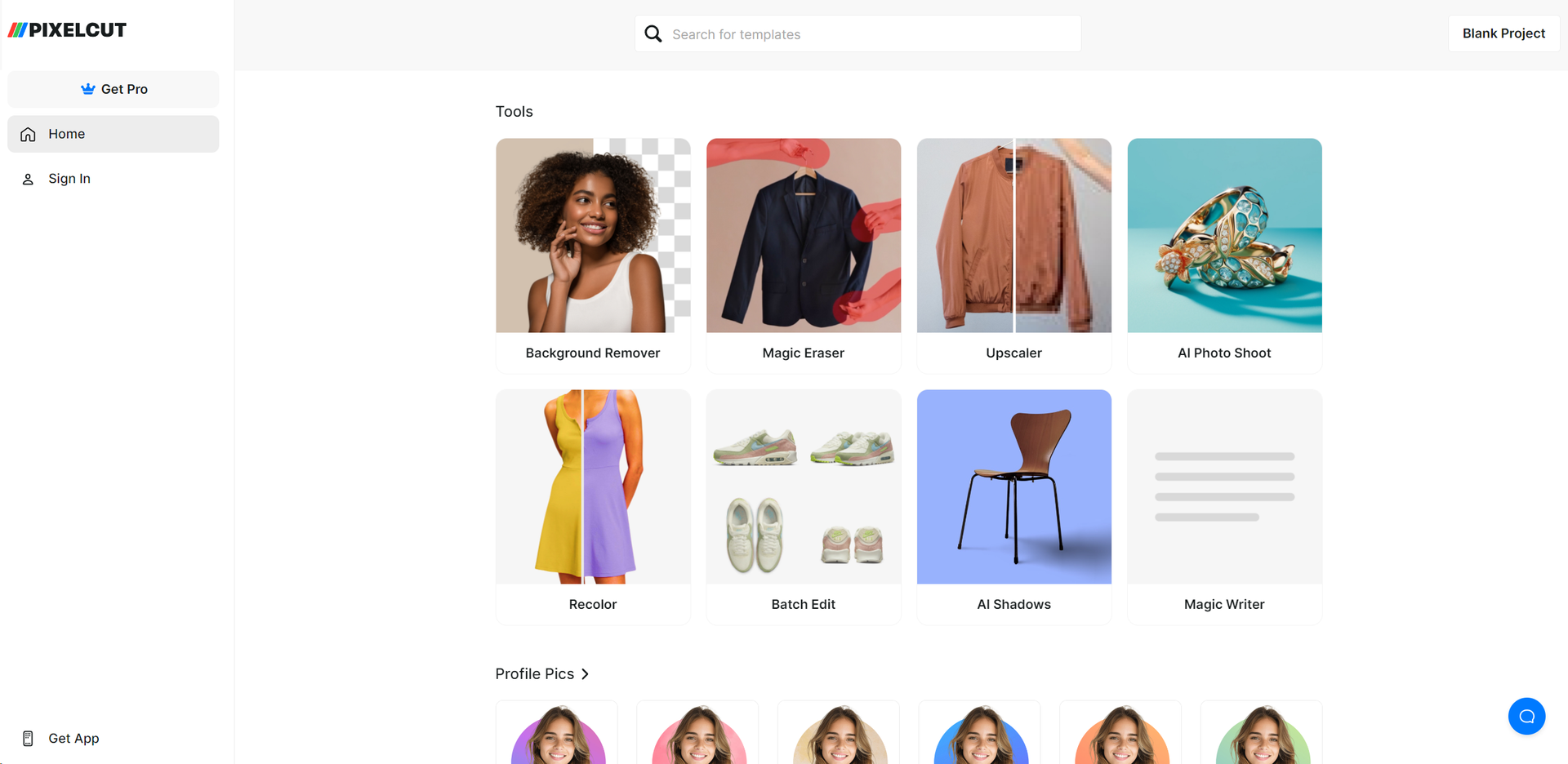
- Background Remover: Automatically removes backgrounds from images, making it perfect for product photos, profile pictures, and more.
- Magic Eraser: Effortlessly removes unwanted objects or blemishes from photos, ensuring a clean and focused image.
- Image Upscaler: Enhances the resolution of images without losing quality, ideal for printing or high-definition publishing.
- Batch Edit: Allows for the editing of multiple photos at once, significantly saving time and ensuring consistency across images.
- AI Shadows: Introduces realistic shadows to images, adding depth and a professional touch to your photos.
- Recolor Image: Adjusts the color scheme of your photos, offering creative flexibility to match your branding or aesthetic preferences.
- API Access: Provides developers with the tools to integrate Pixelcut’s functionalities into their own applications.
- ProsTime Efficiency: Dramatically reduces the time needed for complex photo editing tasks.Cost-Effective: Eliminates the need for expensive photo shoots with its virtual studio capabilities.User-Friendly Interface: Designed to be intuitive, making it accessible for users of all skill levels.High-Quality Results: Delivers professional-grade photo editing results, enhancing the visual appeal of any project.ConsLearning Curve: Some users may need time to familiarize themselves with all the available features.Internet Dependency: Requires a stable internet connection for optimal performance.Limited to Digital Use: Primarily designed for digital content, which may not meet all professional photographers' needs.
Best For
- E-commerce Businesses: Utilizing the tool to create visually striking product photos without the need for physical photo shoots.
- Social Media Influencers: Leveraging the app to polish their photos for a more professional online presence.
- Graphic Designers: Incorporating Pixelcut into their workflow for efficient photo editing and design creation.
- Small Business Owners: Using the tool to create marketing materials and social media content quickly and cost-effectively.
- Uncommon Use Cases: Non-profit organizations enhancing their event photos for better engagement; bloggers using the tool to create standout imagery for their posts.
Integrations
Mobile Compatibility: Pixelcut is available on iOS and Android, allowing users to edit photos on the go. API Access: Enables developers to integrate Pixelcut’s powerful editing tools into their own applications, extending its functionality. Cloud Storage Integration: Seamlessly works with cloud storage platforms for easy access and management of photos. Social Media Integration: Directly share edited images to social media platforms, streamlining the content creation process.
Similar Tools
Weekly Issue
⚡
Image Editing tools · weekly digest
The AI Weekly — free in your inbox
New AI tools, pricing changes, expert picks, and hidden gems — curated by Mr. Spark every week. Join 5,000+ readers who stay ahead of the AI curve.
No spam, ever
Unsubscribe anytime
100% free