
Pricing Details
Free: Includes up to 3 presentations, unlimited sessions, 1 collaborator (edit/moderate only), 7-day reporting history, and 1,000 total AI credits. Starter: $40 per month; includes up to 3 themes, 30 presentations, hybrid sessions, 60-day reporting history, and 2,000 monthly AI credits. Pro: $100 per month; includes all Starter features plus branding, up to 2 collaborators, 180-day reporting history, and 6,000 monthly AI credits. Enterprise: Custom pricing; includes all Pro features plus personalized onboarding, SSO for members and participants, team roles (coming soon), adjustable data-keeping policy, and unlimited AI credits. Book a demo with the sales team to see all pricing options. Disclaimer: Please note that pricing information may not be up to date. For the most accurate and current pricing details, refer to the official StreamAlive website.
Product Visuals (1 images)
Strengths
- Low-friction for participants: Attendees answer in the existing meeting chat, avoiding QR codes, extra links, and separate apps.
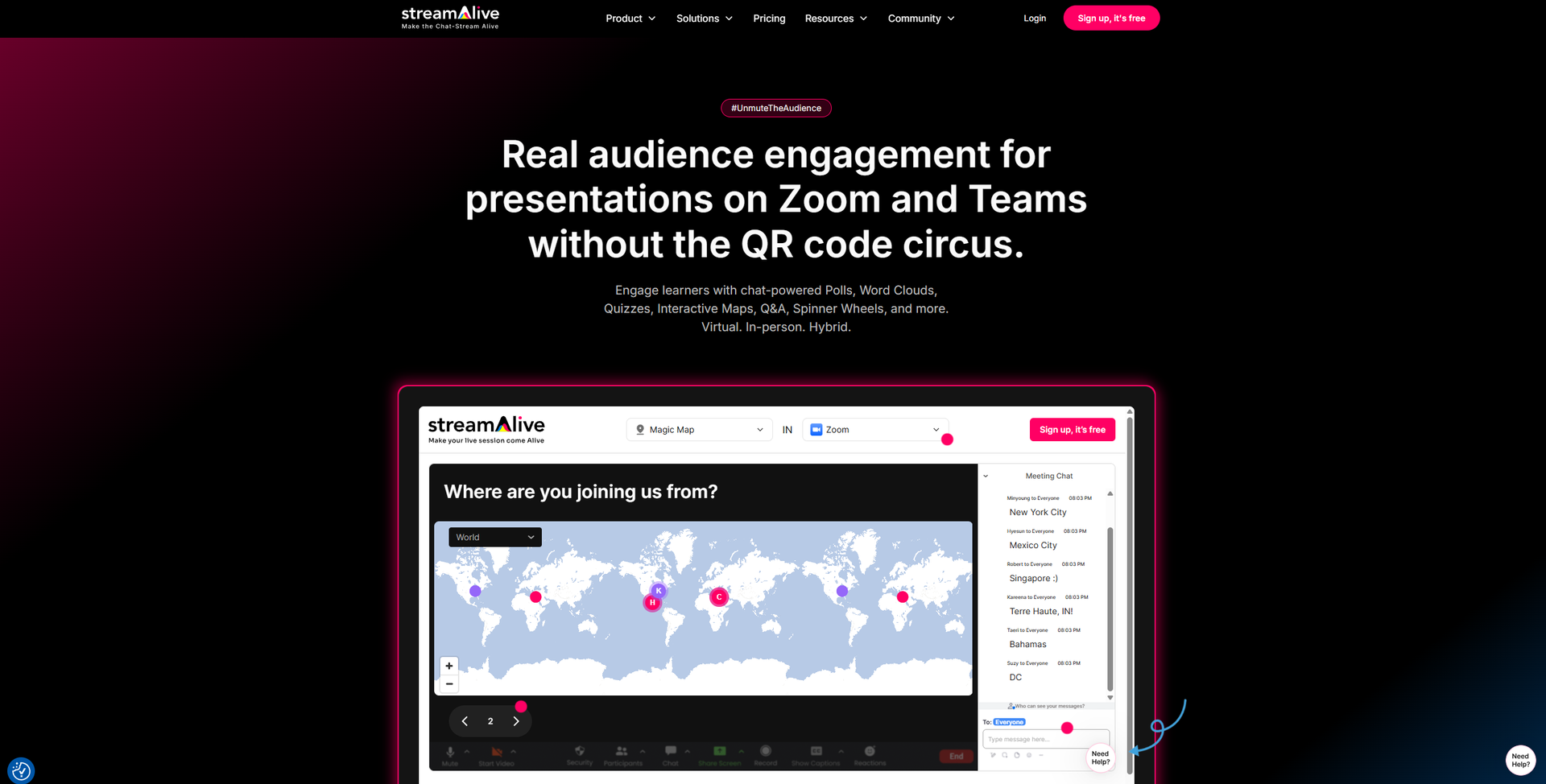
- Visually rich sessions: Maps, wheels, word clouds, and emoji effects keep attention on the content instead of background multitasking.
- Time savings for hosts: AI-generated questions and summaries reduce preparation time and make reporting to stakeholders easier.
- Training-focused design: Use cases, templates, and copy are tuned for instructor-led training, corporate learning, and webinars.
Limitations
- Live-first orientation: Strongest for real-time sessions and less useful today for fully self-paced or on-demand courses.
- Host learning curve: Presenters must learn how to connect meetings, manage the app window, and time interactions confidently.
- Pricing jump after free tier: Free use covers only small groups, so some solo trainers may feel the cost step-up.
Building your AI toolkit?
Save StreamAlive and 1,000+ tools — free with Google, no spam
What You Get
Key Features
- Chat-powered visuals: Polls, word clouds, Magic Maps, rating bars, spinner wheels, emojis, and tiles transform simple chat messages into live visuals.
- AI Interaction Generator and templates: Upload a deck or describe the topic and the tool proposes ready-to-run polls, questions, and activities from 1,700+ templates.
- Chat intelligence and analytics: Automatically captures questions, builds leaderboards, extracts links, summarizes busy chats, and produces shareable reports after each session.
- Integrations and presentation builder: Works with PowerPoint, Google Slides, Zoom, Teams, Google Meet, YouTube Live, Twitch, and a browser-based builder for full slide-plus-interaction sessions.
- ProsLow-friction for participants: Attendees answer in the existing meeting chat, avoiding QR codes, extra links, and separate apps.Visually rich sessions: Maps, wheels, word clouds, and emoji effects keep attention on the content instead of background multitasking.Time savings for hosts: AI-generated questions and summaries reduce preparation time and make reporting to stakeholders easier.Training-focused design: Use cases, templates, and copy are tuned for instructor-led training, corporate learning, and webinars.ConsLive-first orientation: Strongest for real-time sessions and less useful today for fully self-paced or on-demand courses.Host learning curve: Presenters must learn how to connect meetings, manage the app window, and time interactions confidently.Pricing jump after free tier: Free use covers only small groups, so some solo trainers may feel the cost step-up.
Best For
- Corporate L&D and training teams: Using it to make compliance, sales, and onboarding sessions more interactive and measurable.
- Universities and schools: Supporting virtual lectures, review classes, and large cohorts where chat normally moves too fast to follow.
- Consultants, coaches, and facilitators: Running client workshops and masterminds with live polls, Q&A, and visual feedback.
- Marketers and event organizers: Turning webinars, launches, and community calls into two-way conversations instead of slide monologues.
- Uncommon Use Cases: Used by religious and spirituality groups for participatory sermons and study circles; Adopted by gaming communities for viewer-controlled challenges and live stunts.
Similar Tools
Presentations tools · weekly digest
The AI Weekly — free in your inbox
New AI tools, pricing changes, expert picks, and hidden gems — curated by Mr. Spark every week. Join 5,000+ readers who stay ahead of the AI curve.