
Pricing Details
Free Tier: Experience Zoho Show with no cost involved, offering all essential features. Disclaimer: Please note that pricing information may not be up to date. For the most accurate and current pricing details, refer to the official Zoho Show website.
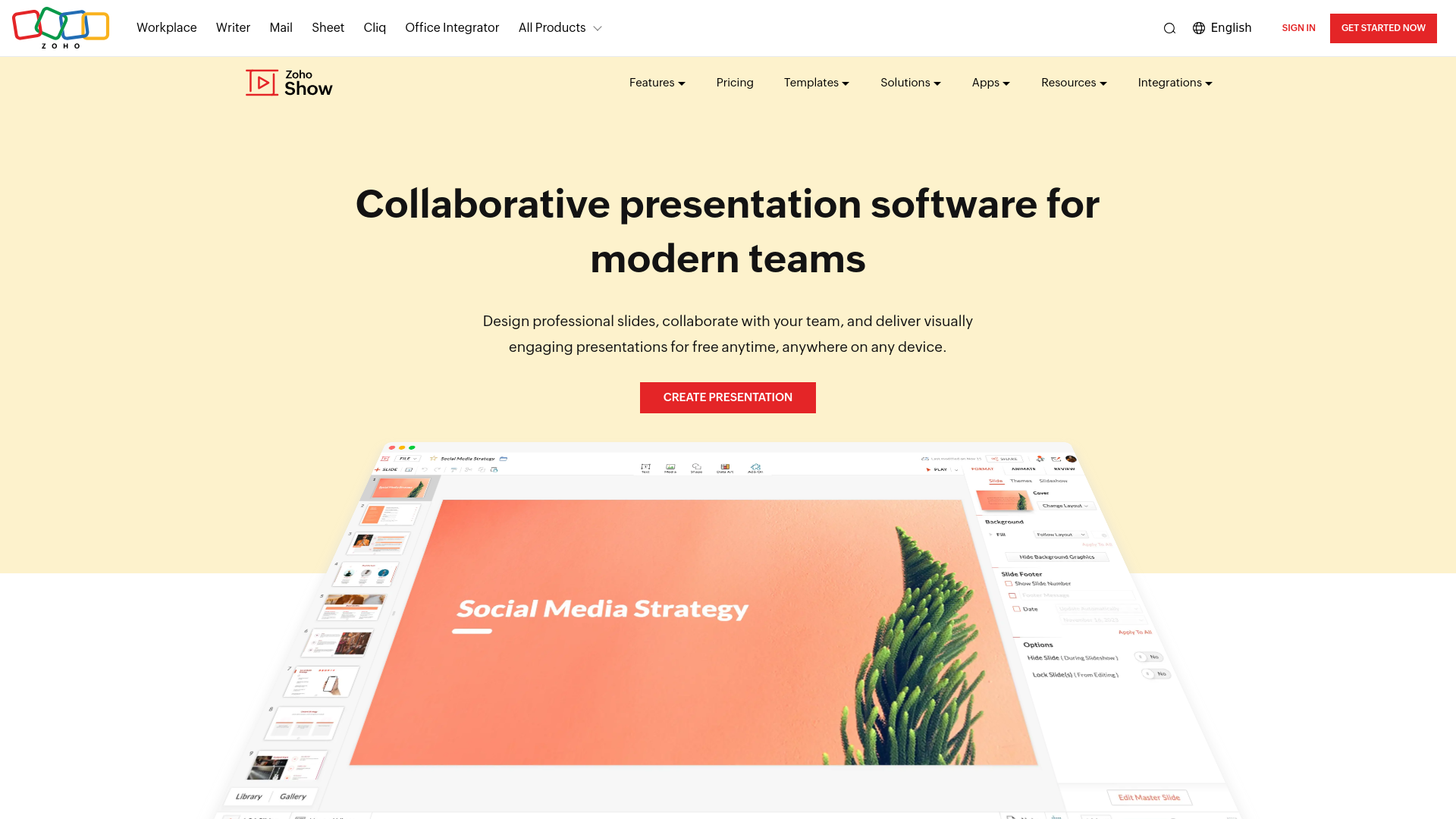
Product Visuals (1 images)
Strengths
- User-Friendly Interface: Zoho Show’s minimalist and contextual UI makes it easy to use, even for beginners.
- Versatile Export Options: Users can export presentations in various formats, including PPTX, PPSX, HTML, ODP, and PDF.
- Integration Capabilities: The tool integrates seamlessly with popular platforms, enhancing its usability within different software environments.
- Free to Use: Zoho Show is completely free with no ads, providing excellent value for its robust feature set.
Limitations
- Limited Advanced Features: While Zoho Show covers most presentation needs, it may lack some advanced features found in other specialized presentation tools.
- Initial Learning Curve: New users might need some time to fully explore and utilize all the capabilities of the software.
Building your AI toolkit?
Save Zoho Show and 1,000+ tools — free with Google, no spam
What You Get
Key Features
- Collaborative Presentation Creation: Zoho Show enables real-time collaboration, allowing multiple users to work on a presentation simultaneously. This feature ensures seamless teamwork and enhances productivity.
- Professional Templates: The tool comes pre-loaded with over 100 customizable templates, catering to various professional needs such as startup pitch decks, sales presentations, and business proposals.
- Data Visualization: Users can bring their data to life with custom shapes, infographics, animations, and transitions, making presentations more dynamic and engaging.
- Cross-Device Compatibility: Zoho Show is accessible on multiple devices, including smartphones, tablets, and smart TVs, allowing users to control and broadcast their presentations effortlessly.
Best For
- E-commerce Businesses: Utilizing Zoho Show for creating engaging product presentations and marketing materials.
- Digital Marketing Agencies: Employing the tool for developing visually appealing campaign content and client proposals.
- Educators: Leveraging the platform to create interactive and captivating lecture slides and virtual yearbooks.
- Corporate Teams: Using Zoho Show for internal communications, training sessions, and project proposals.
- Uncommon Use Cases: Freelance photographers use Zoho Show to create stunning portfolios; event planners design and share event schedules and presentations.
Similar Tools
Weekly Issue
⚡
Presentations tools · weekly digest
The AI Weekly — free in your inbox
New AI tools, pricing changes, expert picks, and hidden gems — curated by Mr. Spark every week. Join 5,000+ readers who stay ahead of the AI curve.
No spam, ever
Unsubscribe anytime
100% free