
Pricing Details
Free Version: Basic features available at no cost. Pro Version: Enhanced features and support starting at $18 per month. Disclaimer: For the most accurate and current pricing details, refer to the official Quadratic website.
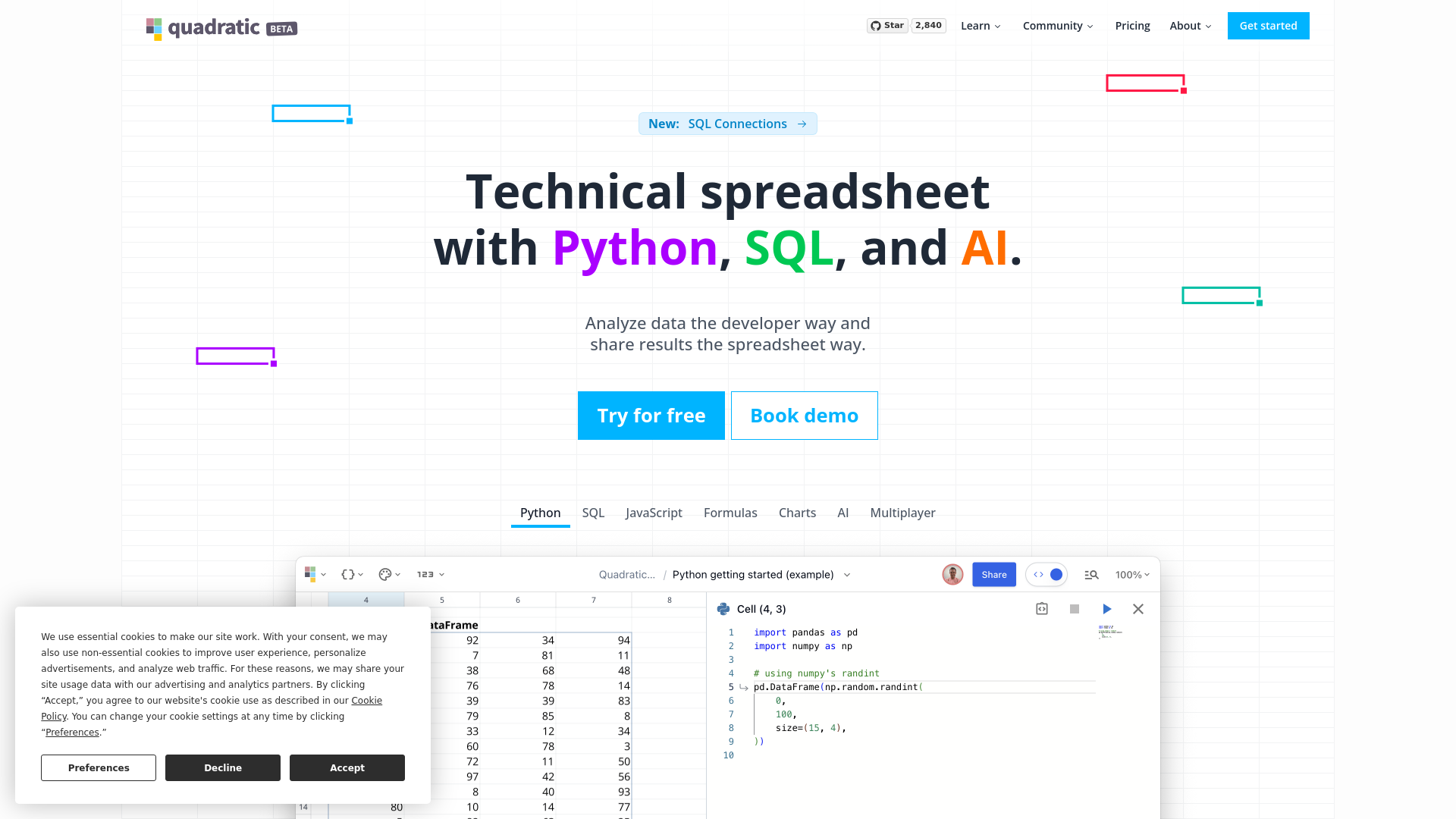
Product Visuals (1 images)
Strengths
- Enhanced Data Handling: Direct API integration and support for complex structures like Pandas DataFrames are ideal for modern data analysis.
- User-Centric Design: Offers a smooth, responsive experience even with large data sets, designed like a video game for optimal performance.
- Advanced Customization: Multi-line formulas and direct code expansion cater to both novice and advanced users.
- Privacy and Security: Local data storage ensures that sensitive information remains secure and operations are swift.
Limitations
- Learning Curve: Users unfamiliar with Python or SQL may need time to fully leverage Quadratic's features.
- Limited Language Support: Currently supports only Python and SQL, with plans to include JavaScript, which may restrict some users.
- Initial Setup: Integration with existing IT environments might be challenging for some organizations.
Building your AI toolkit?
Save Quadratic and 1,000+ tools — free with Google, no spam
What You Get
Key Features
- Python and SQL Integration: Execute Python and SQL directly within spreadsheet cells, combining familiar spreadsheet functions with robust programming capabilities.
- Dynamic Data Visualizations: Utilize the Plotly library within Quadratic for creating and manipulating interactive charts and graphs.
- Real-Time Collaboration: Allow multiple team members to view and edit spreadsheets simultaneously, with live updates enhancing productivity.
- Infinite Canvas: Navigate and organize data on a flexible, infinite workspace, ideal for complex data sets and analyses.
- AI-Powered Autocomplete: GPT-4.0-powered autocomplete for Python code helps streamline coding by predicting snippets and reducing syntax errors.
- ProsEnhanced Data Handling: Direct API integration and support for complex structures like Pandas DataFrames are ideal for modern data analysis.User-Centric Design: Offers a smooth, responsive experience even with large data sets, designed like a video game for optimal performance.Advanced Customization: Multi-line formulas and direct code expansion cater to both novice and advanced users.Privacy and Security: Local data storage ensures that sensitive information remains secure and operations are swift.ConsLearning Curve: Users unfamiliar with Python or SQL may need time to fully leverage Quadratic's features.Limited Language Support: Currently supports only Python and SQL, with plans to include JavaScript, which may restrict some users.Initial Setup: Integration with existing IT environments might be challenging for some organizations.
Best For
- Data Scientists: For advanced data analysis and visualization within an intuitive spreadsheet.
- Software Engineers: To integrate coding directly into data workflows for improved efficiency.
- Business Analysts: Utilizing real-time data manipulation and visualization to make informed business decisions.
- Academic Researchers: Performing complex scientific computations and managing data.
- Uncommon Use Cases: Non-profits analyzing large datasets for reporting; startups using it for data-driven pitches to investors.
Integrations
API Integration: Pull data from external APIs into spreadsheets. Plotly for Data Visualization: Direct integration with Plotly for creating interactive charts. Upcoming SQL and JavaScript Support: Future updates will include expanded language support. Web Assembly and WebGL: Utilizes advanced web technologies for optimal performance.
Similar Tools
Weekly Issue
⚡
Spreadsheets tools · weekly digest
The AI Weekly — free in your inbox
New AI tools, pricing changes, expert picks, and hidden gems — curated by Mr. Spark every week. Join 5,000+ readers who stay ahead of the AI curve.
No spam, ever
Unsubscribe anytime
100% free